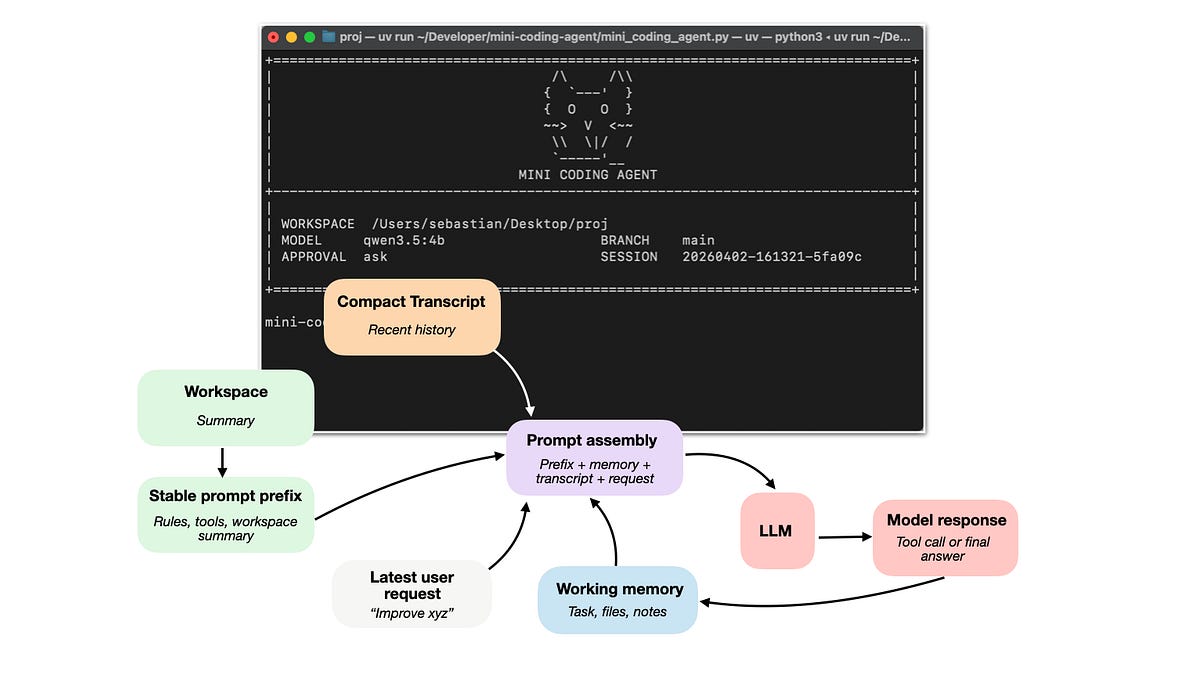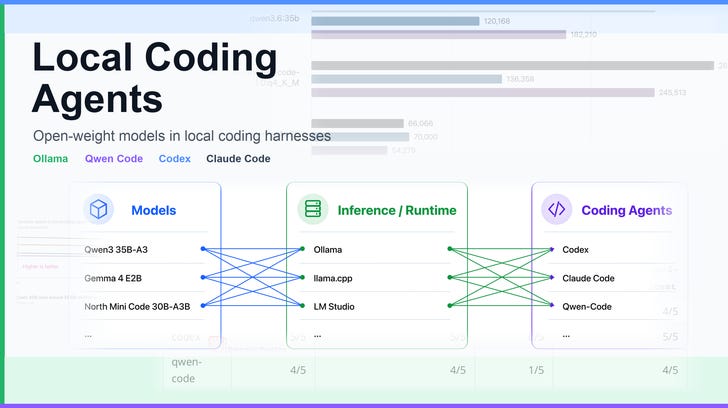
Many people reached out to me in the past asking about my local agent stack as well as how I set up my local agent stack.So, I thought it might be useful to put together a little tutorial on how to set up a local (coding) agent using open-source tools and open-weight LLMs.Figure 1: Overview of the local stack, that is, a coding agent harness that uses a local model hosted through an inference engine / runtime server.This article is a tutorial on setting up a production-ready coding agent with a fully local stack. We will use a locally served LLM together with a local coding harness that can read files, make edits, run commands, and verify changes as shown in the figure above.Here, we can think of the LLM as the engine that provides the reasoning and code generation. And the surrounding harness provides the operating environment that allows the LLM to do meaningful coding work in our local projects.Why local? For many coding workflows, a local setup is an interesting alternative to proprietary services such as GPT in Codex or Opus in Claude Code. The local setup is transparent, inspectable, and free to run apart from hardware and electricity costs. It also stays fully under your control, and you can modify the coding harness in any way you like. Plus, it’s a lot of fun!By the way, in case you want a bit more background information on coding agent harnesses, I covered the core components of coding agents (and building a coding agent from scratch for learning purposes) here: I have to admit that I still primarily alternate between Codex and Claude Code as my daily drivers, for now (and just to keep up with the new tooling and functions that are constantly being added). Also, the plan limits (especially for Codex) are still so generous that I haven’t had to worry about costs so far.However, I’ve been using local solutions for a while, too, to test things and because it somehow gives me joy to have and use a fully local setup (versus proprietary services).Either way, local solutions become more and more attractive each day. One aspect is the costs. If you have the hardware, they are practically free to run. And then there’s, of course, the privacy angle. For example, for organizing and processing my receipts, I’d be more comfortable with a local model ingesting them rather than sending the data over to OpenAI or Anthropic.(Then, if we keep in mind that Anthropic was recently throttling their flagship model’s performance for LLM research, proprietary services may become more restrictive over time, and it’s maybe a good idea to be comfortable with open-weight alternatives as a backup.)And there are many, many additional reasons and use cases like that.Your motivations for using local LLMs and coding harnesses may include:Predictable, fixed costs if you reach your subscription plan limits, and immunity to API price changes.Reproducibility; sometimes it’s nice if a model is upgraded (e.g., GPT 5.4 -> GPT 5.5 -> GPT 5.6) and it solves all your queries more reliably. However, this can also break existing workflows.Offline use in the classic airplane flight scenario with slow or no internet, or when going on a coding/writing retreat in the cabin in the woods w/o a Starlink subscription.And there are probably several others.So, in this article, we will set up and use popular harnesses like Codex and Claude Code with open-weight models and investigate whether using a model-specific harness (like Qwen-Code for Qwen3.6) brings any additional benefits. (Of course, there are many more harnesses like OpenCode, Cline, Pi, and Noumena Code, but I thought that most people already have muscle memory with either Codex or Claude Code, which makes switching to open-weight models a bit smoother).Most coding agent harnesses follow similar principles and have more or less the same features and functionality. However, the implementation details may differ, and certain LLMs have usually been primarily optimized for a specific harness. Of course, many open-weight LLMs like GLM 5.2, for example, would run Claude Code, etc.However, if an LLM developer also develops a coding harness, it is somewhat safe to assume that their model is optimized for their own harness first (while also supporting others).Here, I am primarily going to use Qwen3.6 with the Qwen-Coder coding client. However, I will also go over other options for using a local LLM with other agent harnesses, for example, Claude Code, Codex, and the increasingly popular Cline, but more on that later.The reason why I am primarily using Qwen-Code when working with Qwen models is that:it is open-source, like Codex (https://github.com/openai/codex) but unlike Claude Code;Qwen models have been specifically optimized for the Qwen-Code harness (more information below);I can run both Codex (with the latest GPT model) and Qwen-Code with a local Qwen model side by side on the same machine without having to switch manually back and forth between models.Regarding the second point in the list above, that Qwen models work better in Qwen-Code, Nvidia’s Polar: Agentic RL on Any Harness at Scale paper (May 2026) has a benchmark showing that the Qwen3.5-4B base model has the best coding performance in said Qwen-Code harness (both before and after their Polar-RL training), which I included below.The benchmark in the table above is for an older Qwen3.5 model, and I am assuming that the latest Qwen3.6 models are even further optimized to do well in Qwen-Code specifically.However, Pi (https://github.com/earendil-works/pi) also seems to be a very interesting candidate that I need to play around with in the future.By the way, Qwen3.6 35B-A3B is about 22 GB to download, requires roughly 30-40 GB of RAM, and runs pretty swiftly on both a Mac Mini with M4 and a DGX Spark.Based on the recent benchmarks shared by Cohere earlier in June, it is currently the best local model in its size class.As seen above, Qwen3.6 35B-A3B dominates all but one benchmark in this size class. However, that being said, Qwen Code is a general harness and also supports other types of models. For instance, we could also connect North Mini Code or Gemma 4 in Qwen Code.Figure 4: Yes, Qwen3.6 35B-A3B is a really good model! (Via x.com/pupposandro/status/2064707907489272147/)Architecture-wise, the Qwen3.6 35B-A3B model has hybrid attention similar to Qwen3-Coder and Qwen3.5. I wrote more about it in Beyond Standard LLMs.Figure 5: Qwen3.6 architecture and fact sheet from my LLM gallery.Alternatively, if you don’t want to use Qwen3.6, Cohere’s North Mini Code is probably the most interesting, capable alternative at this size class right now. I will go over this model in the next local LLM setup section as well.Figure 6: North Mini Code architecture and fact sheet from my LLM gallery.No matter what agent harness we use (Qwen-Code, Codex, or Claude Code), we have to set up a local LLM, such as Qwen3.6 35B-A3B, first.There are several options like Ollama, LM Studio, vLLM, SGLang, MLX, etc to serve models locally. You know from my Build A Large Language Model (From Scratch) and Build A Reasoning Model (From Scratch) projects that I like to code these myself. Implementing a model from scratch has the benefits that we understand the whole stack, plus we can modify and further train and fine-tune it.However, here, we just look for a model serving framework that has been super optimized for inference speed and resource needs since we don’t plan to do any training or fine-tuning at this point. (We could, as an extra step, convert and import our own from-scratch fine-tuned model into these efficient serving stacks, but this is out of the scope for this article.)For this tutorial, we will use Ollama as our efficient model serving engine because it’s relatively easy to install and use from the command line across different operating systems (although LM Studio also added a non-GUI llmster client, but I am less familiar with it).By the way, I am not affiliated with any of the tools mentioned in this article, but one nice thing about Ollama is that they also optionally support open-weight models hosted in the cloud, including the currently strongest open-weight model, GLM 5.2, which is too large to run locally on consumer hardware. (The cloud models are not free, of course, but have similar subscription plans as ChatGPT and Claude; it’s still nice though that this option exists to conveniently test the latest state-of-the-art open-weight models “locally.”)Anyways, setting up Ollama is pretty straightforward, and you can find the official macOS/Linux/Windows download instructions on their download page.After installing, I recommend downloading a model for a quick test run. For instance, on macOS, we can use the ollama app to download models directly via the GUI:Figure 7: Using the Ollama app to find and download modelsOtherwise, this can be done on the command line as well viaBy the way, the above-mentioned qwen3.6:35b-mlx is a model using Apple’s Metal performance shaders, i.e., optimized for Macs with Apple silicon chips. I highly recommend using *-mlx versions of models working on Macs (if available).Figure 8: Prefer the MLX version when using a Mac (with an Apple Silicon chip).On a Linux machine, use the non-MLX version:Then, to make sure that it works, you can either use the GUI again or launch Ollama from the command line.Figure 9: Running Ollama in the terminal.You can exit this session via the /bye command.As mentioned before, the currently best alternative to this Qwen3.6 35B-A3B model is North Mini Code 1.0 of similar size.Figure 10: North Mini Code 1.0 as an alternative to Qwen3.6 35B A3B.Before deciding on whether to use an LLM as a local coding agent, it’s usually not a bad idea to run a quick speed and quality assessment. Here, for the speed assessment, I would look for tokens/sec performance. Additionally, I’d also make sure this stays stable for (very) long contexts, which is what we are usually dealing with during agentic coding workflows (as opposed to simpler chatbots).Of course, we also don’t want the memory cost to explode either.You could run my ollama_speed_memory_bench.py script to do a quick check. In a nutshell, it sends different prompts (ranging from 1k to 50k words) to an Ollama model and asks it to generate up to 8k tokens by default. It reports simple statistics like prefill speed from Ollama’s prompt evaluation metrics, generation speed from output-token timing, and memory use from the Ollama process plus NVIDIA GPU memory when available.For example, to evaluate the qwen3.6:35b-mlx on macOS, if you downloaded or cloned the scripts from https://github.com/rasbt/local-coding-agent-evals, we can run the following, which takes about 5 minutes:On Linux, we can run:Note that this assumes that you already downloaded the respective model as explained in the previous section. Also, depending on your system, if you have less than 30 GB RAM, you may have to use a smaller model like gemma4:e2b, which uses up to about 8 GB RAM on long contexts. Of course, there are also many smaller models, but in my experience, they make pretty bad local coding agents.)Note that for models, the RSS RAM report is not super accurate on macOS (especially for mlx model variants that utilize the Metal backend), and I suggest keeping an eye on the activity monitor’s RAM usage for Ollama during the run as well. In this case, the RAM usage fluctuated between 20 - 29 GB.Anyways, the bottom line is that for 50k contexts, the Qwen3.6 and North Mini Code models use up to 30 GB RAM and generate output with about 40 tok/sec on a recent Mac Mini and 30 tok/sec on a DGX.Below is a visual summary of the different runs.Figure 11: Quick speed comparison of the different models on different systems. Note that the macOS RAM consumption is not super accurate there. Also, note that the Qwen 35B-A3B model is faster on Mac than on the DGX Spark (which is the other way around for the Gemma 4 E2B model) thanks to the optimized MLX version. Code to reproduce: https://github.com/rasbt/local-coding-agent-evalsAnother interesting question is how Qwen 35B-A3B compares to the similarly-sized Cohere North Mini model? If we take similarly quantized models into account (above, I was using the Qwen3.6 default), they are pretty similar, although North Mini is perhaps slightly ahead overall, as shown below.Anyway, the bottom line is that, in my opinion, anything faster than 20-30 tok/sec is pretty reasonable for local agent work. This is about the same speed as GPT 5.5 with “high” reasoning. In this case, both models clear the bar easily.By the way, personally, I run my agents almost exclusively on my DGX Spark because I don’t want my Mac Mini to get too hot and I want to have the RAM available for other tasks.Of course, there are always ways to optimize this more with different frameworks (other than Ollama), quantizations, MTP, and so on. However, Ollama is a good plug & play allrounder with minimal setup time that connects easily to various coding agent frameworks and where it’s super simple to swap and try out different models.After checking that the model is fast enough for convenient local work, I recommend doing a quick modeling performance assessment. Sure, there are many standardized benchmarks out there we could take a look at and even run ourselves.Usually, you can find the numbers for relevant benchmarks in the model’s technical report or model hub page. Usually, I also find it useful to look at a relative comparison with other models on https://artificialanalysis.ai/models/.Based on the figure above, we can see that Qwen3 35B-A3B is much more capable than the Gemma 4 E4B and E2B models, for example.Note that the Artificial Intelligence Index numbers keep changing over time as they swap benchmarks and update the weighting, so there are no “absolute” numbers we could use as a reference point for deciding which model is “good enough”. Rather, I would compare a new, interesting model to a model you used before as an anchor or reference point.Beyond standard benchmarks, I would also curate a personal set of tasks that are relevant to you to do a quick check whether this model is even suitable for any type of work that you might want it to perform.Below are the outputs of a reasoning- and code-related set of questions that also test the tool calling capabilities of the models. Here, the model returns the tool call but doesn’t execute the code itself.➜ uv run ollama_hard_reasoning_bench.py --model qwen3.6:35b
Using Local Coding Agents
Using Open-Weight Models in Local Coding Harnesses as an Alternative to Claude Code and Codex Subscriptions
6,073 words~28 min read