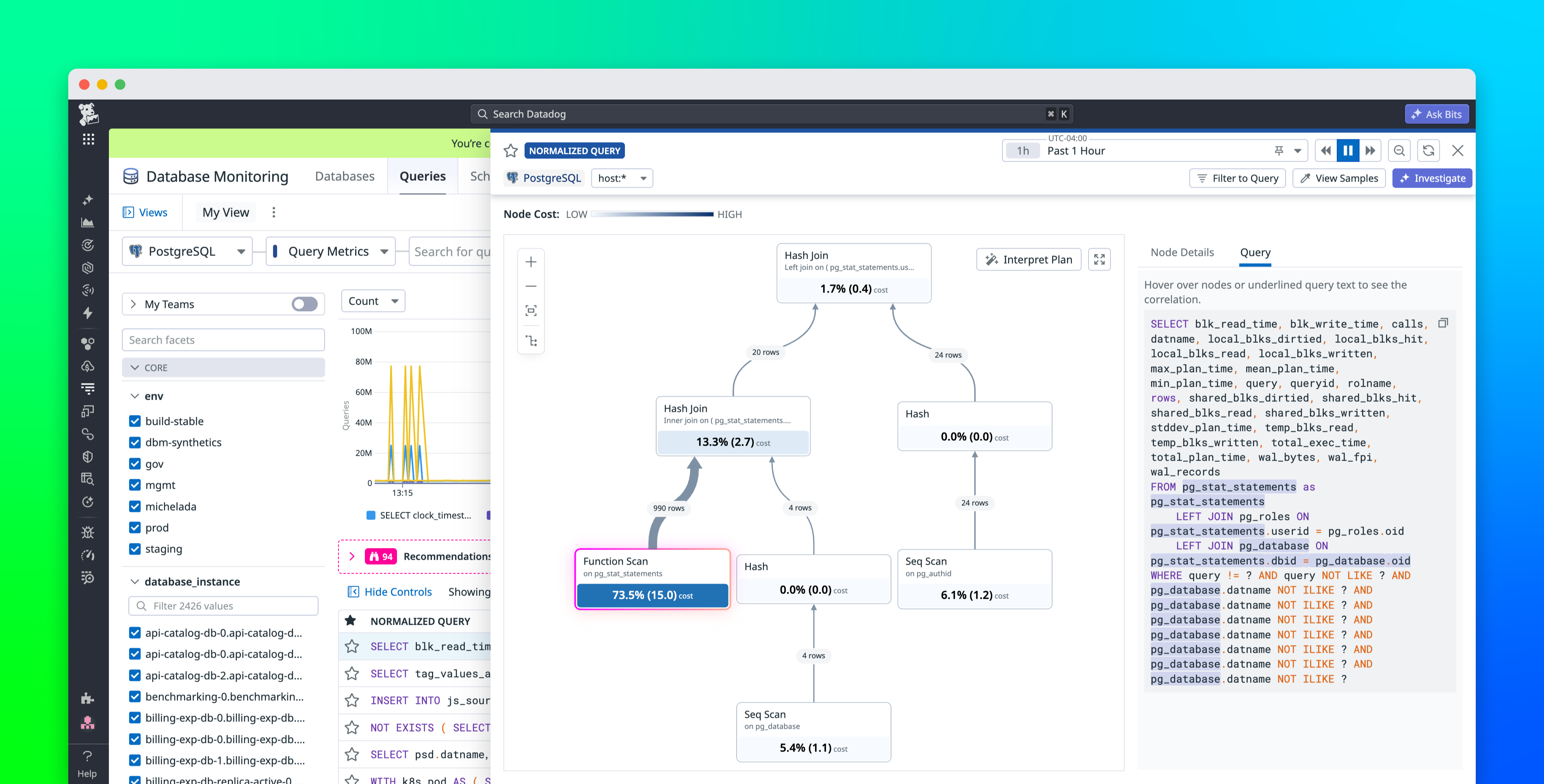
Allen Zhou Eddie Cai When a PostgreSQL query runs slowly, engineers often start with EXPLAIN ANALYZE. The output is a tree of plan nodes, each one describing a step the database took to execute it. A query with several joins and a subquery can produce 20 or more nodes. But the plan gives no visual indication of which node corresponds to each clause in the SQL text. Diagnosing the problem means viewing the plan in one window and the query in another, manually tracing connections between them. Even a single misread can send the investigation in the wrong direction.
Explain plan correlation in Datadog Database Monitoring closes that gap for both EXPLAIN ANALYZE and EXPLAIN plans by linking each plan node directly to the SQL clause it represents. You can explore this relationship by hovering over a node to see which clause it maps to. The same interaction works in reverse. Selecting a clause in the SQL text highlights the corresponding plan node, and the mapping remains consistent across parameterized queries and table aliases.
In this post, we’ll show how to use explain plan correlation to:
Understand how explain plan nodes map to SQL textIdentify costly nodes in multi-join queries
Understand how explain plan nodes map to SQL text