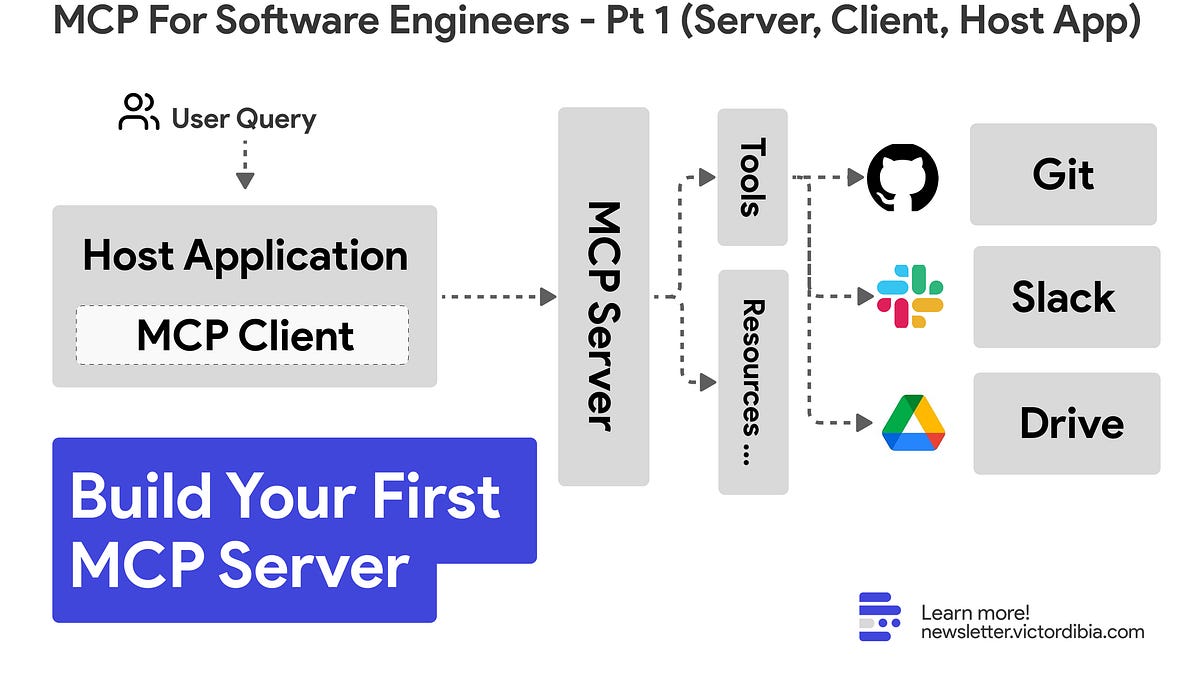
When I first tried out the Model Context Protocol (MCP) from Anthropic (March 2025), the developer experience was rough. Integrating and bundling MCP with existing applications was challenging, and there were a few security pitfalls that developers had to navigate. I wrote about that experience here. If you are visually inclined - here is a video walkthrough of this post.Model Context Protocol (MCP) is a standard for how AI applications connect to tools and data sources. Simply put: your AI app needs to call tools, monitor requests, handle prompts, and get user approval. MCP standardizes all of this. However, like all good standards or protocols, MCP has evolved and gotten better (see recent changelog including fixes to sdks, improved support for remote servers, improved auth). And I can now see it solving several critical problems faced by teams building AI applications. Integration: Without MCP, Team X spends weeks integrating Team Z's new tool. With MCP, Team X announces day-one support for any MCP tool (including Team Z’s new capabiltiies!).Distribution: Without MCP, Team X writes a Cursor extension, a Windsurf plugin, a VSCode extension, a Claude Desktop add-on, and more. With MCP, Team X writes one MCP server that works everywhere.Discovery: Without MCP, teams ask "Does anyone have a tool that does X?" With MCP, there's a central registry where teams publish and find tools.Security: Without MCP, each team implements (or skips) their security/auth for the tools or resources that LLMs use. With MCP, its possible to implement centralized auth and managed registry of MCP servers. Runtime Flexibility: Without MCP, you're stuck with hard-coded tool configurations. With MCP, tools can be dynamically discovered based on context. Also, it can be helpful to have aspects of the the application logic (e.g., tool execution on remote MCP servers) managed by an MCP server as opposed to running within the host applicaitonIn this tutorial (part 1 of a series on MCP for Software Engineers), we will cover the following: Building an MCP server that exposes tools (fetch news from techcrunch)Creating a client to connect to the serverBuilding a host application that uses an LLM to translate user requests to tool calls on the MCP server.Choosing between stdio and Streamable HTTP transports for MCPBonus : how to use the MCP Server we create in VSCode (or any other tool) Note: This series is not for those seeking to learn about the "latest productivity hacks with MCP in some existing host application (Cursor, Windsurf etc)." Screenshot of the server we will build, shown in the AutoGen Studio MCP PlaygroundMCP has an excellent and well maintained documentation site. In brief, here are key concepts to get started. Server: MCP servers expose capabilities through a standardized interface. A single server can provide multiple tools (functions to call), resources (data to read), prompts (templates for LLM interactions), and sampling (request LLM completions from the client).Client: MCP clients maintain 1:1 connections with servers and handle the protocol communication. Hosts embed clients to talk to servers.Host MCP hosts are user-facing applications like Claude Desktop, Cursor, or VSCode. They use clients to connect to servers and decide which tools to call based on user needs.Transport MCP uses JSON-RPC 2.0 with two transport options - stdio and streamable HTTP. Stdio runs the server as a subprocess using standard input/output - ideal for local integrations where the server runs as a subprocess of the client (e.g., IDE extensions, local development tools). Streamable HTTP uses network requests - better for web applications, distributed systems, multiple clients connecting to one server, and easier debugging/monitoring.For this tutorial, we'll use the Streamable HTTP as it provides a better learning experience with clearer separation of concerns (you can run the server on a remote machine) and easier debugging.Now that we've covered the core concepts, let's build your first MCP server. We'll use the Python MCP SDK, which is mature and widely adopted, but the same concepts apply to other languages.Protocol vs SDK ?MCP mostly defines a protocol or standard - essentially a set of rules that says clients and servers MUST/SHOULD/SHALL/SHALL/NOT do X and Y in order to communicate. Now SDKs are an implementation of these rules. While you can build your own compliant servers/cleints, in general, it is recommended that you use SDKs for more standardized behaviors where possible.Our goal: build a tool that can answer news-related queries like "What is the latest AI news on TechCrunch?"Create a new Python project and install the MCP SDK.Using uv (recommended):uv init mcp-news-demo
MCP For Software Engineers | Part 1 : Building Your First Server
#44 | New to MCP? Heres how to build your first MCP server and a Host Application that integrates and uses the server.
1,930 words~9 min read