WARPTECHNEWS · LAB
HomeAIBusinessTechArchive
WARPTECH LAB NEWS

Warptech Lab News aggrega le notizie più rilevanti da oltre 700 fonti internazionali, con classificazione AI, TL;DR sintetici e timeline cluster su singole storie.

Navigazione

  • Home
  • Archivio
  • Editor's Brief
  • Cerca
  • Il tuo account
  • Newsletter tech/AI

Informazioni legali

  • Privacy Policy
  • Termini di servizio
  • Cookie Policy

© 2026 Sparktech S.R.L. — Tutti i diritti riservati. Sito gestito e manutenuto da Sparktech S.R.L.

Sede legale: Corso Libertà 55, 13100 Vercelli (VC), Italia · P.IVA / C.F. 02835910023 · Contatti: admin@warptechlab.com

Home
Storia in 1 fonti

Making the Most of Components in FlutterFlow

When building apps, many teams run into the same problem: the same elements get rebuilt multiple times. A login form here, a card design there, a button that looks just slightly different depending on who built it. Over time, this slows down development and creates inconsistencies in the user experience.FlutterFlow’s Components feature solves this by letting you turn any widget or group of widgets into a reusable building block. Once created, a component can be dropped into any page of your app, customized with parameters, and updated in one place so changes cascade everywhere it is used.For startups, this means moving faster without reinventing the wheel. For agencies, it means delivering consistent results across multiple client projects.What You Can Do With ComponentsComponents are not just shortcuts. They are powerful tools for maintaining design consistency, improving collaboration, and reducing errors. Here are a few common uses:Shared UI elements: Create a standard header, footer, or navigation bar once and reuse it across your app.Forms and inputs: Build a login form, contact form, or checkout field set as a component so they are consistent wherever used.Cards and lists: Package up product cards, user profile tiles, or content previews as components that can be dropped into multiple screens.Custom interactions: Add built-in actions or animations so that every instance of the component behaves the same way.By thinking of components as your personal design system, you can scale apps with fewer inconsistencies and less rework.How to Create and Use ComponentsCreating a component in FlutterFlow is simple:Select widgets: Highlight one or more widgets you want to turn into a component.Convert to component: Use the “Create Component” option, give it a name, and save.Reuse: The component now appears in your widget panel and can be added anywhere in your project.Customize: Add parameters so each instance of the component can accept input values such as text labels, icons, or callback actions.Once created, components behave just like widgets. You can bind them to data, animate them, or nest them inside other components.Docs: Using Components in FlutterFlowBest Practices for ComponentsTo get the most value out of components, it helps to follow a few best practices:Think ahead: Build components for patterns you know you will reuse, like buttons, forms, or modals.Use parameters: Expose variables such as text, colors, or actions so the component can adapt without needing separate versions.Document clearly: Add descriptions inside the component so teammates know its purpose and how to use it.Combine with Libraries: For larger teams or agencies, package components into a Library so they can be reused across multiple projects.Keep it simple: Avoid making components so complex that they are harder to manage than the widgets they contain.Real-World ExamplesA startup builds an onboarding flow with several screens. By making each screen a component, they can reuse it in different branded apps with minimal tweaks.An agency creates a Library of UI components such as nav bars, product cards, and checkout forms. Every new client project starts with these components, cutting delivery time dramatically.A dev team working on a marketplace app uses components to standardize how items are displayed. When the design changes, they only update the component once and every screen updates automatically.Bringing It TogetherComponents in FlutterFlow are more than convenience features. They are a way to bring consistency, speed, and collaboration into your app-building process. By creating reusable building blocks, you save time, reduce errors, and ensure that every part of your app feels like it belongs together.Whether you are a startup racing to launch an MVP or an agency juggling multiple client apps, making the most of components can be the difference between a project that drags on and one that delivers quickly with confidence.

Raccontata daflutterflow.io

Timeline cronologica

  1. martedì 19 maggio 2026·flutterflow.io

    Making the Most of Components in FlutterFlow

    When building apps, many teams run into the same problem: the same elements get rebuilt multiple times. A login form here, a card design there, a button that looks just slightly…

  2. martedì 19 maggio 2026·flutterflow.io

    The Hidden Cost of Frontend Bloat and How FlutterFlow Solves It

    Understanding how complexity builds up in enterprise frontends, and how a modular approach can help teams stay fast and alignedAs enterprise products grow in scope, it’s common…


  • martedì 19 maggio 2026·flutterflow.io

    Streamlining Development Workflows With FlutterFlow

    Shipping an app is rarely about building features alone. Teams also need to manage environments, test changes, maintain consistency, and move updates safely from development to…

  • martedì 19 maggio 2026·flutterflow.io

    Managing Multi-App Portfolios in FlutterFlow

    Many teams today are responsible for more than one app. Startups may need a customer-facing app, an internal tool, and an investor dashboard. Agencies often manage portfolios of…

  • martedì 19 maggio 2026·flutterflow.io

    Performance Pitfalls in Visual Development (and How to Avoid Them)

    Visual development has changed the way teams build apps. By moving from hand-coding every element to building in a collaborative UI, startups, agencies, and even enterprises can…

  • martedì 19 maggio 2026·flutterflow.io

    An Engineering Manager’s Guide to Scaling Teams With FlutterFlow

    When teams are small, communication is easy and codebases are manageable. As your organization grows, new challenges appear:Features take longer because dependencies pile…

  • martedì 19 maggio 2026·flutterflow.io

    From PRD to prototype to production: a practical workflow for FlutterFlow product teams

    Building a great product is rarely about a single moment of inspiration. It is about moving clearly and consistently from idea to execution without losing context along the…

  • martedì 19 maggio 2026·flutterflow.io

    Extending the Capabilities of Apps with Custom Code in FlutterFlow

    FlutterFlow provides a wide range of pre-built components such as buttons, forms, API integrations, and navigation. For many projects, these tools cover most requirements.…

  • martedì 19 maggio 2026·flutterflow.io

    Building for Scale Without Overbuilding

    Startups and agencies often face the same question: how much should we build now versus later?On one hand, you want your app to be ready for growth. On the other, spending months…

  • martedì 19 maggio 2026·flutterflow.io

    Leveraging Libraries for Scalable Apps in FlutterFlow

    As apps grow, teams often face the same challenges: duplicate flows, inconsistent UI, and long delays when trying to share logic across projects. FlutterFlow Libraries solve this…

  • martedì 19 maggio 2026·flutterflow.io

    How to Train and Onboard Teams to FlutterFlow Without Creating Chaos

    A practical guide to getting teams productive fast with clear resources and workflowsWhy Structured Onboarding MattersBringing a new tool like FlutterFlow into your organization…

  • martedì 19 maggio 2026·flutterflow.io

    Onboarding Designers to FlutterFlow: Best Practices for Enterprise Teams

    Enterprise app development is evolving, and designers are playing an increasingly crucial role in bringing visually stunning, user-centric applications to life. Tools like…

  • martedì 19 maggio 2026·flutterflow.io

    FlutterFlow for Backend Teams: Why It’s Not Just a Frontend Tool

    A look at how backend engineers can use FlutterFlow to prototype faster, validate integrations, and support better product deliveryIn many organizations, backend engineers are…

  • martedì 19 maggio 2026·flutterflow.io

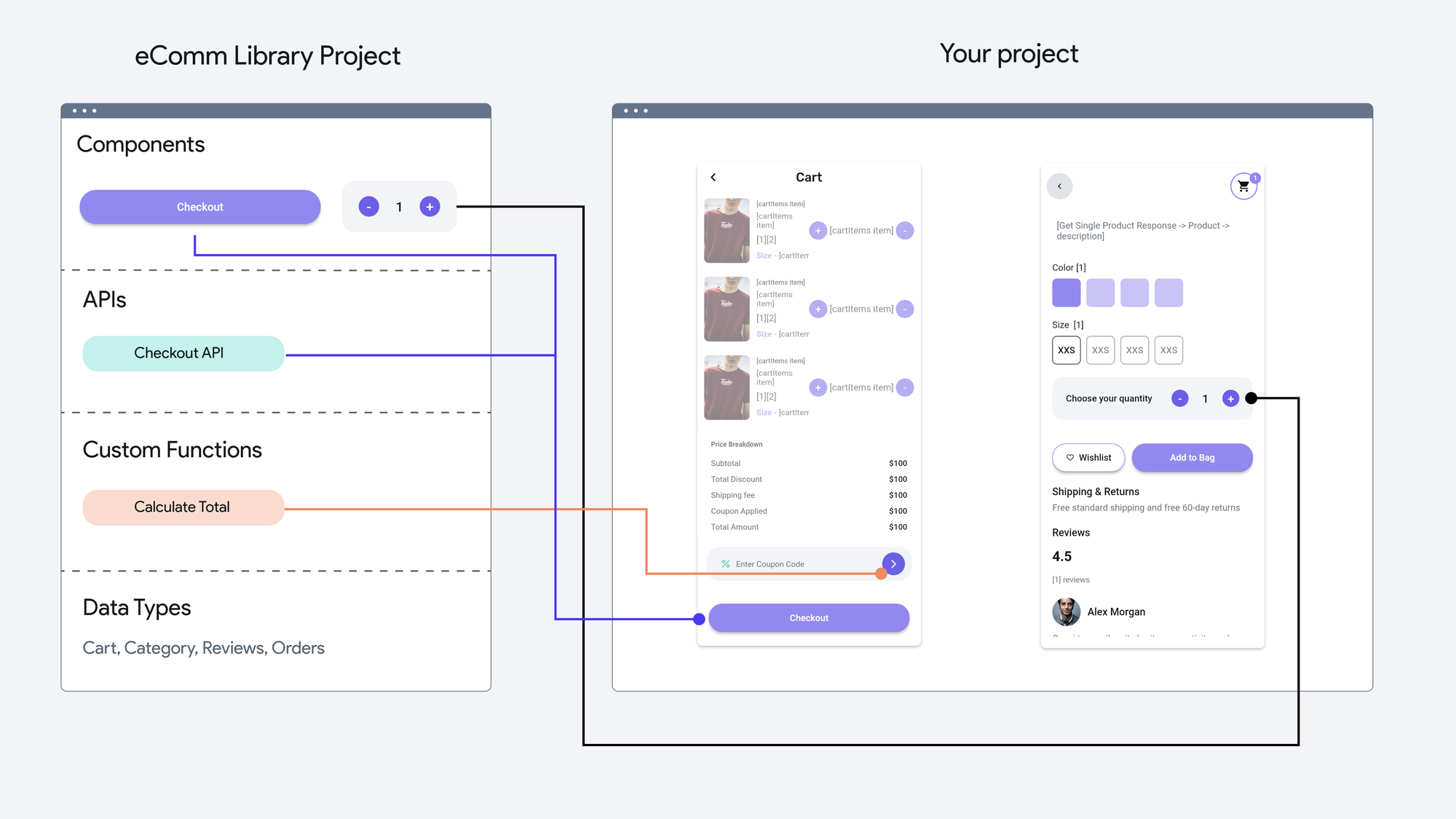
    Empowering Agencies: Streamline App Development & Unlock New Revenue with FlutterFlow Libraries

    Earlier this year at FFDC, we introduced Libraries—a powerful way to share resources across all your FlutterFlow projects. Libraries allow you to centralize components, data…

  • martedì 19 maggio 2026·flutterflow.io

    The Future of Enterprise Applications is Composable

    Why enterprises are moving away from monolithic systems and toward applications built from reusable partsIf you’re leading digital transformation, you’ve probably noticed the…

  • martedì 19 maggio 2026·flutterflow.io

    Pushing the boundaries of what's possible with FlutterFlow

    The gskinner team is well known in the Flutter community for combining innovative design with creative coding to build robust, beautiful applications. Over the past 20 years, our…

  • martedì 19 maggio 2026·flutterflow.io

    Publishing to the FlutterFlow Marketplace

    FlutterFlow Marketplace accepts Libraries which are FlutterFlow projects that can be published as dependencies. When another team imports your Library, they gain access to…