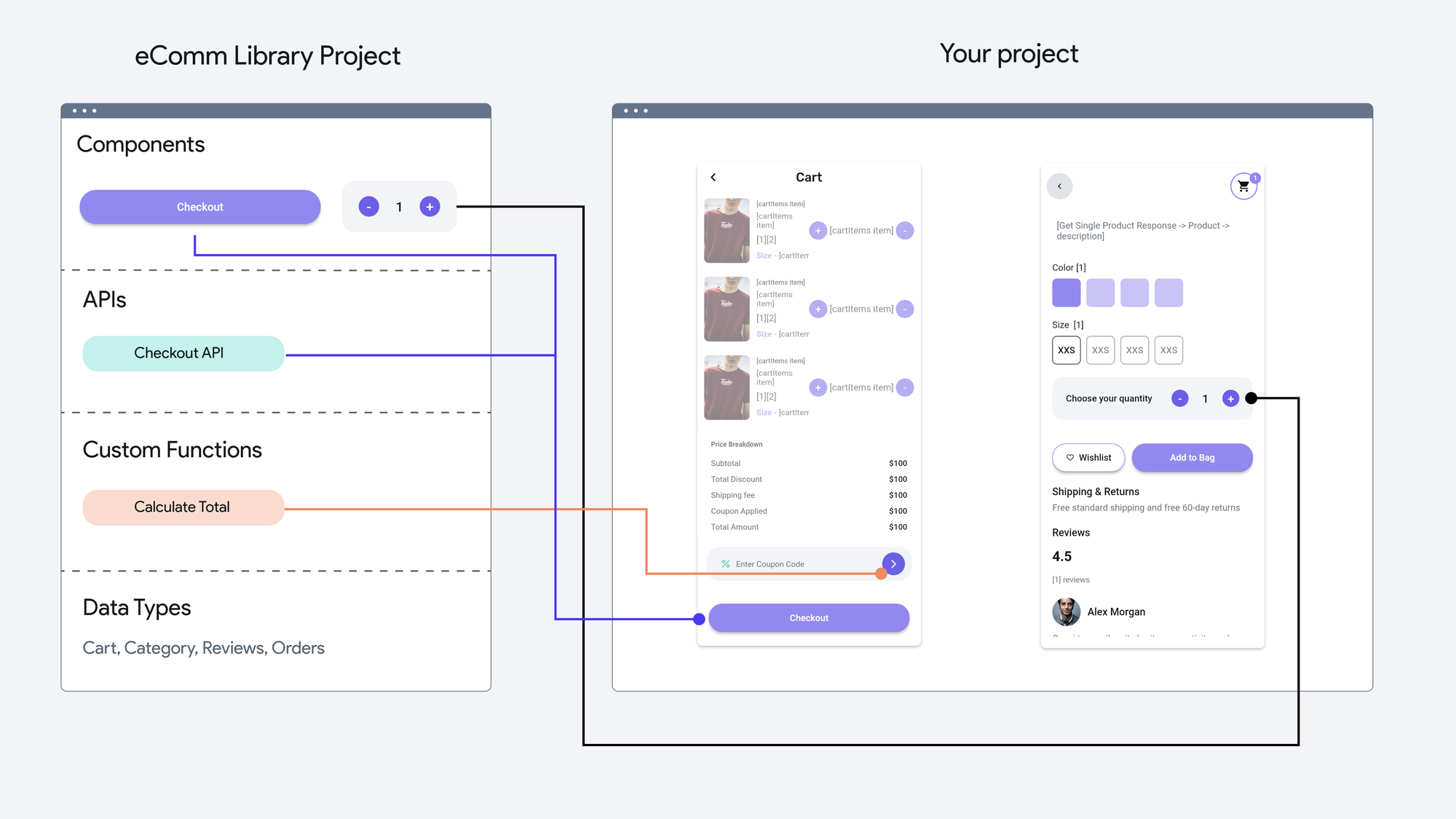
FlutterFlow Marketplace accepts Libraries which are FlutterFlow projects that can be published as dependencies. When another team imports your Library, they gain access to everything you have made available inside it, including:Components (UI pieces like forms, cards, or nav bars)Custom Functions and ActionsApp State Variables and ConstantsAPI CallsCode Files such as classes or enumsAssetsThis modular approach makes Libraries powerful. Instead of just sharing a design, you can share complete functionality such as a payment flow or onboarding system that drops seamlessly into other apps.How to Publish a LibraryPublishing your work to the Marketplace follows a clear process.1. Build Your ProjectStart with a FlutterFlow project as usual. Make sure the project is complete, functional, and tested.2. Prepare for PublishingThere are a few requirements before a project can be turned into a Library:It must not already have been deployed to the App Store or Play StoreAny errors or warnings need to be fixed firstYou must be on a Pro+ plan since Libraries require branching and versioningYou should clone your project before publishing if you want to preserve a “non-Library” version3. Publish as a LibraryGo to Settings and Integrations > App Settings > Publish as LibraryConfirm you are publishing from the main branchAdd a version message so users know what changedPublishAt this point, your project is officially a Library and can be imported by others.4. Add It to the MarketplaceOnce published, you can make the Library visible in the FlutterFlow Marketplace. Here, others can discover it, import it, and reuse it in their own projects.Best Practices for Marketplace SuccessIf you are aiming to create value for others or to build your reputation as a developer, a few tips can help your Library stand out:Document clearly: Add descriptions to your Custom Functions and Actions so other developers know what they doVersion thoughtfully: Publish new versions with clear change notes. This makes your Library predictable and trustworthyUse Library Values: Expose configurable variables like default currency or theme color so your Library is flexible for different projectsKeep dependencies clean: Align versions of shared Libraries to avoid conflictsThink in user journeys: Libraries that package entire flows such as checkout or onboarding are often more useful than single componentsWhy PublishPublishing to the Marketplace is not only about giving back. It can have direct benefits for you and your team:Save time: Reuse your own Libraries across multiple projects instead of rebuilding features from scratchGrow visibility: Show the FlutterFlow community what you are capable ofBuild revenue: With paid Marketplace options, your best work can generate incomeScale faster: For agencies, having a library of prebuilt flows and components means delivering more client apps in less timeBringing It TogetherThe FlutterFlow Marketplace is more than a gallery of components. It is a way to capture your expertise, share it with others, and build apps faster whether you are a solo developer, a startup team, or an agency managing multiple clients.By publishing a Library, you are not only creating something reusable for your own future projects but also contributing to a growing ecosystem of shared solutions.The next time you finish building a flow or feature that others might need, consider turning it into a Library. Submitting to the Marketplace could be the step that transforms your one-off solution into a resource the whole community benefits from.
Publishing to the FlutterFlow Marketplace
FlutterFlow Marketplace accepts Libraries which are FlutterFlow projects that can be published as dependencies. When another team imports your Library, they gain access to everything you have made available inside it, including:Components (UI pieces like forms, cards, or nav bars)Custom Functions and ActionsApp State Variables and ConstantsAPI CallsCode Files such as classes or enumsAssetsThis modular approach makes Libraries powerful. Instead of just sharing a design, you can share complete functionality such as a payment flow or onboarding system that drops seamlessly into other apps.How to Publish a LibraryPublishing your work to the Marketplace follows a clear process.1. Build Your ProjectStart with a FlutterFlow project as usual. Make sure the project is complete, functional, and tested.2. Prepare for PublishingThere are a few requirements before a project can be turned into a Library:It must not already have been deployed to the App Store or Play StoreAny errors or warnings need to be fixed firstYou must be on a Pro+ plan since Libraries require branching and versioningYou should clone your project before publishing if you want to preserve a “non-Library” version3. Publish as a LibraryGo to Settings and Integrations > App Settings > Publish as LibraryConfirm you are publishing from the main branchAdd a version message so users know what changedPublishAt this point, your project is officially a Library and can be imported by others.4. Add It to the MarketplaceOnce published, you can make the Library visible in the FlutterFlow Marketplace. Here, others can discover it, import it, and reuse it in their own projects.Best Practices for Marketplace SuccessIf you are aiming to create value for others or to build your reputation as a developer, a few tips can help your Library stand out:Document clearly: Add descriptions to your Custom Functions and Actions so other developers know what they doVersion thoughtfully: Publish new versions with clear change notes. This makes your Library predictable and trustworthyUse Library Values: Expose configurable variables like default currency or theme color so your Library is flexible for different projectsKeep dependencies clean: Align versions of shared Libraries to avoid conflictsThink in user journeys: Libraries that package entire flows such as checkout or onboarding are often more useful than single componentsWhy PublishPublishing to the Marketplace is not only about giving back. It can have direct benefits for you and your team:Save time: Reuse your own Libraries across multiple projects instead of rebuilding features from scratchGrow visibility: Show the FlutterFlow community what you are capable ofBuild revenue: With paid Marketplace options, your best work can generate incomeScale faster: For agencies, having a library of prebuilt flows and components means delivering more client apps in less timeBringing It TogetherThe FlutterFlow Marketplace is more than a gallery of components. It is a way to capture your expertise, share it with others, and build apps faster whether you are a solo developer, a startup team, or an agency managing multiple clients.By publishing a Library, you are not only creating something reusable for your own future projects but also contributing to a growing ecosystem of shared solutions.The next time you finish building a flow or feature that others might need, consider turning it into a Library. Submitting to the Marketplace could be the step that transforms your one-off solution into a resource the whole community benefits from.