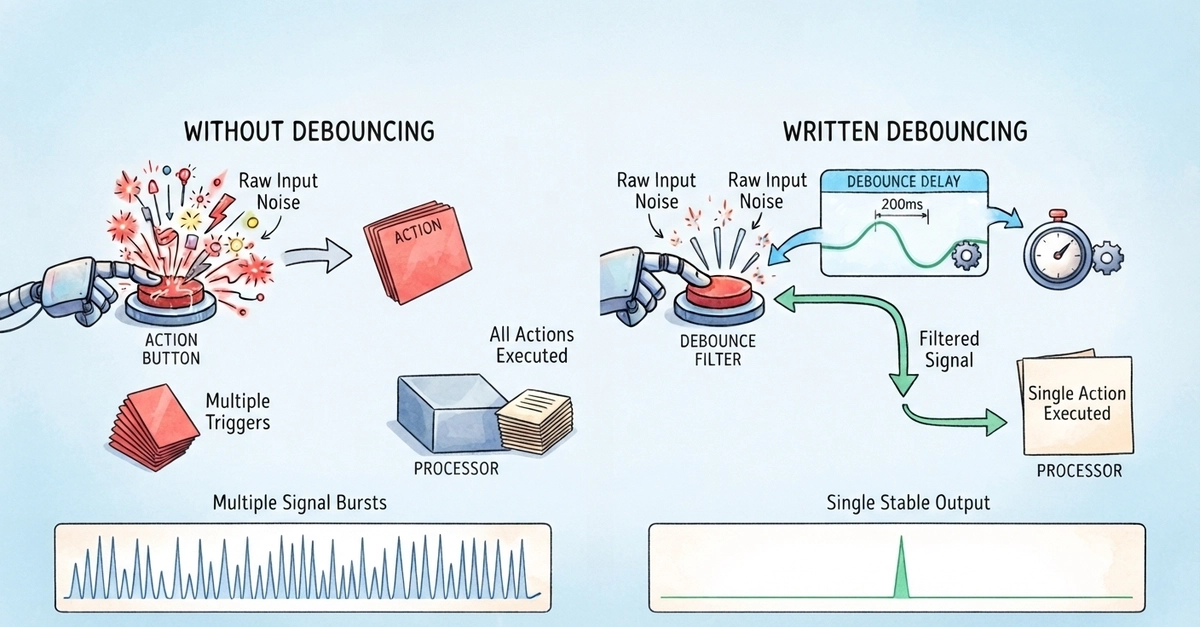
Have you ever typed into a search box and noticed that suggestions don't appear immediately, but only after you pause for a moment?, or you resized your browser window and observed that complex layout recalculations don't happen continuously, but only after you stop dragging?, that's debouncing in action. Debouncing is a powerful technique that prevents excessive function calls during rapid user interactions, dramatically improving performance and user experience.
In modern web applications, events like keystrokes and mouse movements can fire hundreds of times per second. Without proper control, each event could trigger expensive operations like API calls and DOM manipulations, overwhelming your application and creating a sluggish user experience. Debouncing intelligently solves this problem by delaying these events from running until the user has finished their action.
You will get to learn more about debouncing, and how to implement it with JavaScript.
A Problem with Web Apps
Modern web applications are event-driven, so every user interaction such as typing in an input field, clicking a button, scrolling through content etc. runs a certain type of event your application responds to. While this event-driven architecture enables rich, interactive experiences, it also creates a problem called event flooding. This is a scenario where events fire rapidly, overwhelming the single-threaded event loop in JavaScript, and degrading browser performance.