personal tech
The FOSS tool for audio editing has a fresh coat of paint, and new features to boot
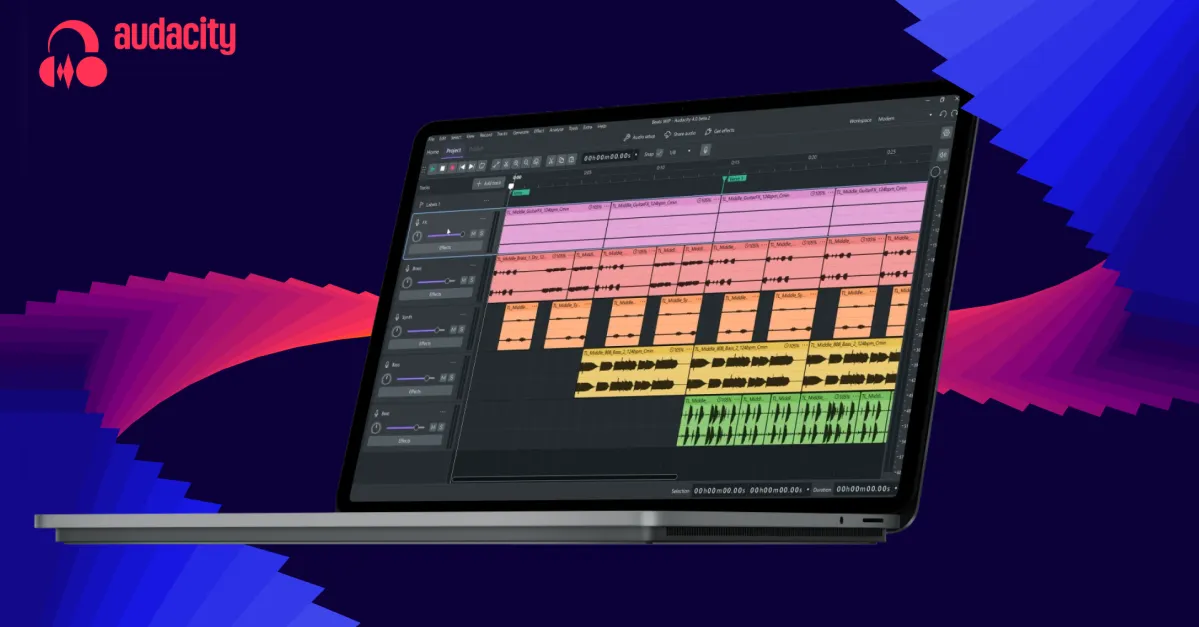
Audacity, a beloved open-source audio editing software tool, has just received a massive makeover.For those unfamiliar with Audacity, it’s a 26-year-old piece of FOSS software that provides incredibly robust audio editing capabilities for the perfect price – $0 – making it ideal for independent musicians, garage bands, vinyl rippers, and college students who want to make a slowly, deliberately spoken foreign-language recording for a group project sound vaguely fluent - not that this vulture would know anything about that.While an incredibly useful tool, Audacity’s interface has been stuck in the mid-aughts for a couple of decades now. That's changed with Thursday's release of Audacity 4.0.0. Not only has the interface been completely overhauled, but there are also a lot of under-the-hood changes as well.
The new UI was rebuilt on Qt and adds a Home screen for recent projects, plus configurable Workspaces. Audacity veterans will notice that the actual editing workflow looks different – much more like a modern piece of software than a relic of the Winamp days.
As part of that redesigned interface, a number of new features bring Audacity into the current age: Clips can be moved over one another, with the underlying portion replaced where they overlap, multiple clips can be selected at the same time, and clips can be grouped for moving as a single object. Audacity 4 also retains non-destructive trimming, meaning trimmed portions of a clip can be recovered simply by extending the clip back into the trimmed-out portion.Audacity users have been crying out for a dedicated splitting tool, parent company Muse Group said in a press release, and that’s been added in version 4. Clip envelopes have also been added, which allow users to adjust the volume and add fades to tracks without altering the original recordings. All of Audacity’s built-in effects have been given an interface redesign as well.