Google Pixel 11 phones ship with an update to screen savers, with support for a new style and the ability to select more than one option and switch through them – much like iPhones do.
Screen savers aren’t enabled by default on Pixel phones, but they are getting quite a bit more useful on the Pixel 11 series.
That starts with a new piece of functionality – you can now set more than one screen saver and switch between them. That’s something that Apple’s “StandBy” feature on iPhone also supports, though it works a bit differently on Pixel. Where it’s just a simple swipe on iPhone, Pixel’s version is tied to the back gesture. You need to swipe in from the edge of the display to move between screen savers – which is a little tricky on the Fold given the side-mounted fingerprint sensor.
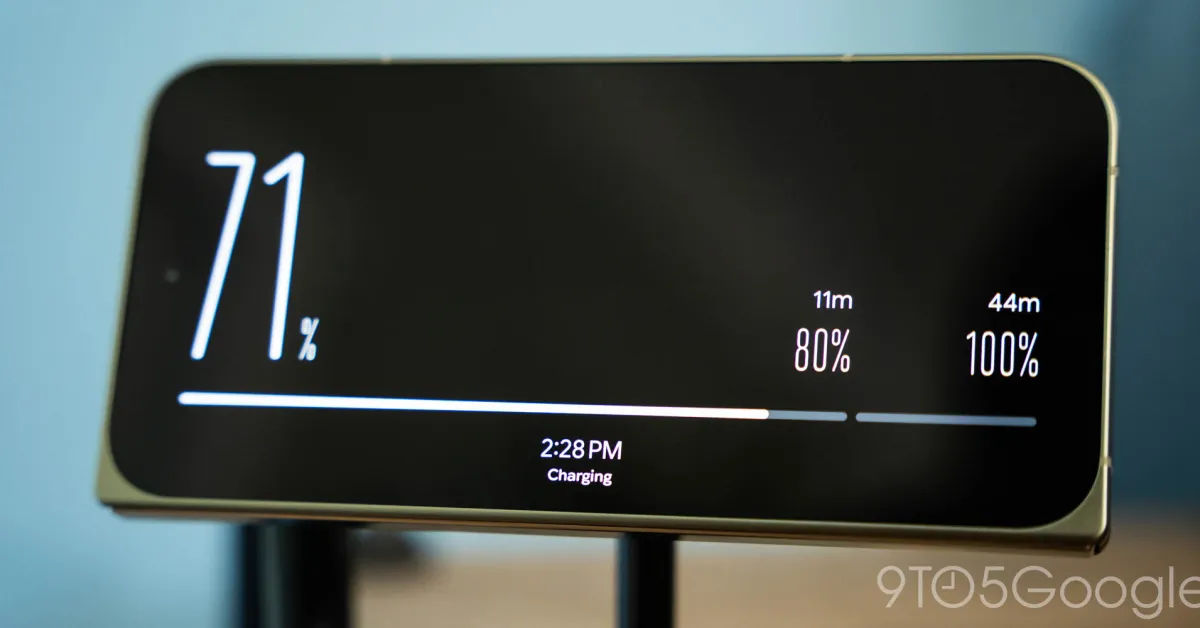
And you might have noticed something new in those screenshots, a new screen saver style. Google has added “Charge” to the lineup, a dedicated screen saver theme that shows the time at the bottom with your battery percentage taking up most of the display. The minimalist design also has a bar that includes stops at 80% and 100%, the former as that’s generally when fast charging tends to slow down. There are time estimates for both.