19 min readJavaScript,
Coding,
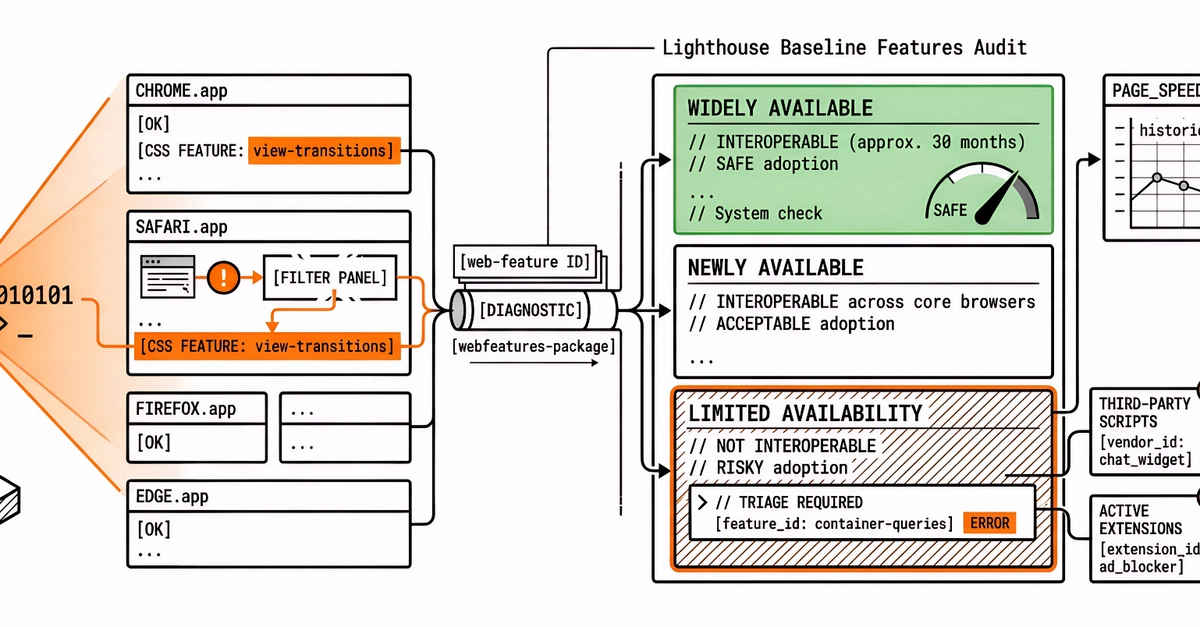
TechniquesThe gap between “you need a library for this” and “the browser does this” keeps closing. A practical guide to auditing your dependencies and finding what the web platform can now handle for you.Most of us install a dependency once and never look at it again. It does its job, the tests pass, and we move on. But the web platform keeps moving too, and a surprising number of the libraries sitting in your package.json today are now built into the browser.In a typical mid-sized JavaScript app, you can often find somewhere between 60KB and 90KB (minified and gzipped) of dependencies that the platform can now handle on its own. Date and number formatting, HTTP requests, modals, tooltips, deep cloning, grouping arrays: these were all real gaps a few years ago. A lot of them aren’t gaps anymore.The reason those libraries stick around isn’t laziness. It’s that most teams don’t re-audit their dependencies on a Baseline cadence, or are simply not aware of how fast browsers are shipping these days. You check npm audit for security, but is this library still doing something the browser can’t? is a question that rarely gets asked. So the libraries stay.In this article, we’ll run that audit together. Instead of going through dependencies one by one, we’ll work in clusters, because the wins tend to come in groups. We’ll do the bundle math, build a small decision framework you can reuse, and stay honest about the cases where the platform still falls short. By the end, you’ll have a repeatable process you can run on your own package.json.(Large preview)What “Baseline” Actually MeansBefore we start deleting things, let’s quickly recap what Baseline is. Feel free to skip this section if you’re already familiar.Baseline is a project from the WebDX Community Group that tells you, in plain terms, how safe a web feature is to use across the major browsers (Chrome, Edge, Firefox, and Safari). A feature can be in one of three states:Limited availabilityThe feature hasn’t shipped in all the major engines yet. Not safe to rely on without a fallback.Baseline Newly availableThe feature has just landed in all the major engines. It works for users on up-to-date browsers, but older devices in the wild may not have it yet.Baseline Widely availableThe feature has been in all the major engines for 30 months. At this point, you can reach for it without much thought.That 30-month gap between “Newly” and “Widely” matters a lot for this audit. A feature that’s Widely available is something you can usually drop a library for today. A feature that’s only Newly available is something you can drop a library for if you check your audience first, or if you’re comfortable with a small feature check. We’ll treat those two cases differently throughout.You can look any feature up on webstatus.dev, on MDN (every reference page shows a Baseline badge near the top), or programmatically with the web-features npm package. We’ll use all three later when we run the audit on a real project.A Decision Framework Before You Delete AnythingIt’s tempting to read “the browser does this now” and start ripping libraries out. Let’s not do that. A swap that looks free on paper can quietly break things for a chunk of your users, or cost you a feature you were relying on without realizing it.So before dropping any library, ask three questions. We’ll reuse these in every cluster below.1. Is the replacement Baseline-safe for my audience?Not “is it Baseline” in the abstract, but “is it safe for the people who actually use my app.” If the native feature is Widely available, this is usually a yes. If it’s only Newly available, check your analytics or your browserslist config and see what share of your users would miss out. A B2B dashboard where everyone’s on the latest browser is a very different situation from a public-facing site with a long tail of old Android devices.2. What does the swap actually cost?Dropping a library isn’t always free. Sometimes the native feature isn’t supported widely enough yet, so you’d reach for a polyfill. If that polyfill is heavier than the library you’re removing, you’ve made your bundle bigger, unless you load it conditionally. We’ll see exactly this with Temporal later.3. Does the platform feature cover my real use case?Libraries often do more than the platform feature they resemble. axios isn’t just fetch with automatic JSON parsing; it has interceptors, request cancellation, and retries. If you’re using those, a straight swap to fetch will leave you reimplementing them. Check what you actually use before assuming it’s a drop-in replacement.Keep these three in mind. Every cluster below is really just these questions applied to a different corner of your dependencies.Cluster 1: Internationalization (The Biggest Drop Today Win)This is the cluster where you’ll usually find the most KBs sitting on top of features that are already Widely available. The browser ships a whole family of formatting tools under the Intl namespace, and a lot of small, popular libraries became unnecessary.Here are the usual suspects and what replaces them:timeago.js (1 KB gz) → Intl.RelativeTimeFormatpluralize (2.3 KB gz) → Intl.PluralRulesnumeral (3.9 KB gz) → Intl.NumberFormathumanize-duration (6.6 KB gz) → Intl.DurationFormatlist-joining helpers → Intl.ListFormatLet’s walk through some of them.Relative Timetimeago.js exists to turn a timestamp into “3 hours ago”. Intl.RelativeTimeFormat does the same thing, and it’s Baseline Widely available.const rtf = new Intl.RelativeTimeFormat("en", { numeric: "auto" });