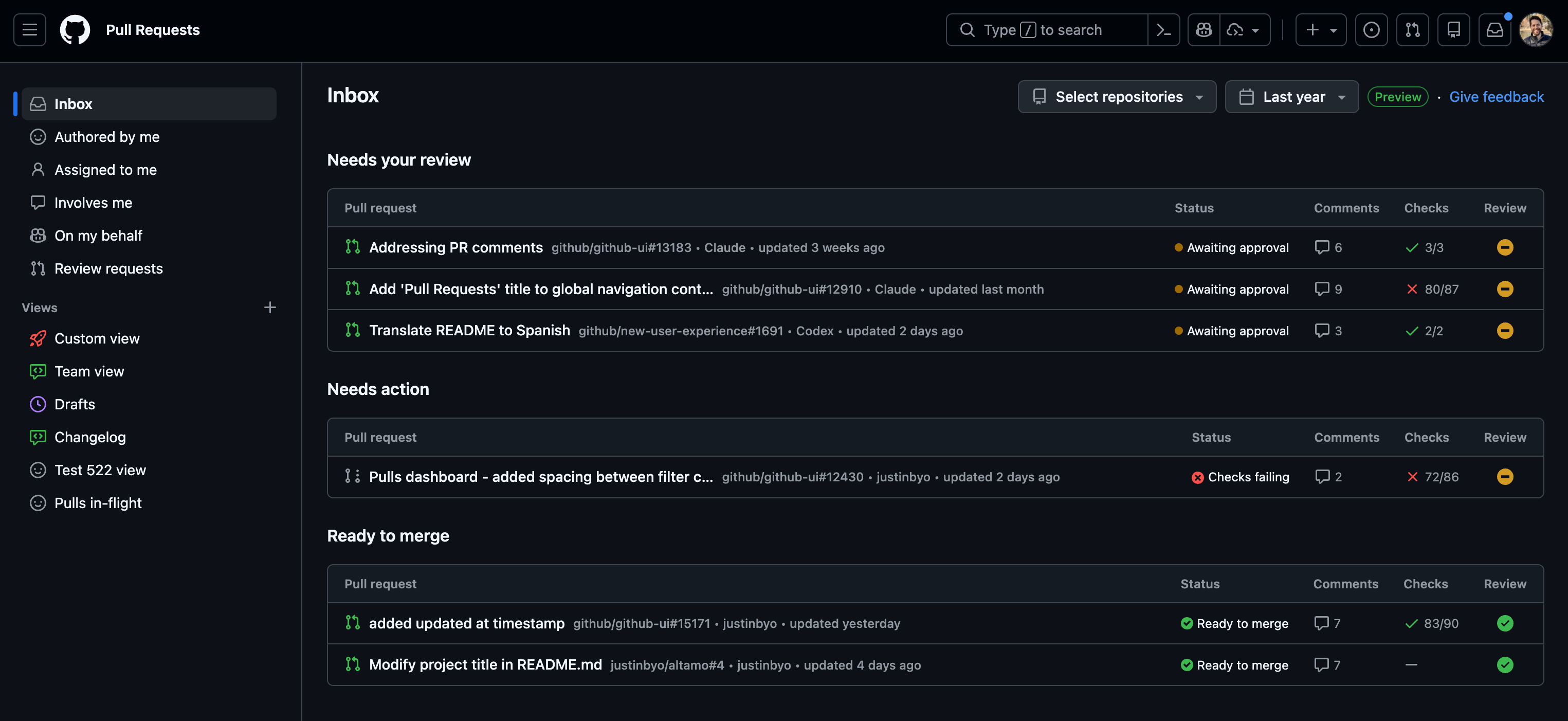
The refreshed pull requests dashboard is now generally available at github.com/pulls. It gives you a single home to track, prioritize, and act on the pull requests that need your attention, whether you’re an individual contributor or a manager working across many teams and projects. This experience was previously in public preview.
Inbox is your new home for discovering the pull requests that need your attention. It surfaces your review requests, pull requests that need fixing (e.g., CI failures or new comments), and pull requests that are ready to merge or in the merge queue. You can reorder or hide sections to match your workflow and filter by repository or recent activity to focus on what matters most.
You can now create, edit, and organize custom views based on your most-used search queries, so you no longer need browser bookmarks to return to a specific filter. To create a saved view, select the Create a view (+) icon in the sidebar, name your view, and select Save view.
New filtering and search options help you find exactly what you’re looking for:
Smart default filters give you quick access to pull requests with built-in filters like Authored by me, Assigned to me, Involves me, and Review requested.