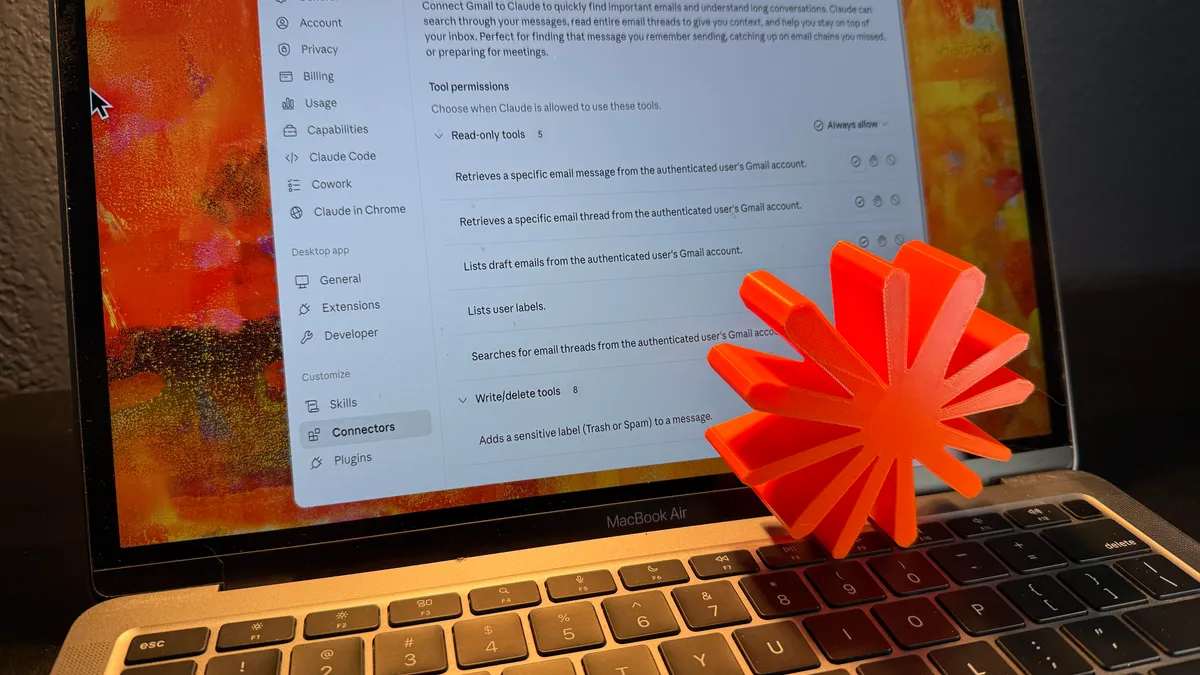
David Gewirtz/ZDNETFollow ZDNET: Add us as a preferred source on Google. ZDNET's key takeaways Claude Cowork turned inbox chaos into usable article research.Gmail search struggled with context and discernment.Human verification remains essential before using AI-found quotes.How often have you had to sift through a ton of emails to find messages you need? I'm not talking about searching for one or two by a proper name. I'm talking about finding a set of email messages on a specific theme from the thousands in your inbox. I had to do this a few weeks ago. Because of my role as a tech journalist, my inbox overflows with people and companies pitching me on something or other. Because part of my beat is AI, my Gmail gets positively slammed whenever I write about something that a company executive or PR rep wants to be included in. And, you know what? Sometimes I find those pitches to be quite valuable. Also: Anthropic's Claude Cowork heads to the cloud as data shows 90% of sessions aren't for codingTake, for example, the day last month when it became apparent that Anthropic was throttling Fable 5 users down to Opus. A whole bunch of folks, including genuine experts on the topic, sent me emails with their comments on the disclosure. That was a busy week. I received more than 7,000 emails, almost all related to something having to do with AI, Claude, Fable, and the rest. Gmail's Gemini has limits In the past, I would spend hours sifting through my emails to find the information I needed. But this is the age of AI, so I asked Gmail to do it for me. Sometimes, Gmail's Gemini does a pretty good job. Not this time. This time, it failed spectacularly. Here's what I asked it:Look in my Gmail promotions tab. I received a lot of emails from people who have opinions or want to be quoted about Anthropic's Fable 5. Please summarize the basic pitches for each of them (going back to Monday). Highlight any quotes or pitches that push back against Fable's restrictions as either too restrictive or not restrictive enough.I think Gmail just couldn't understand the context in each message. It does well when I ask it to find simple messages or topics, or the latest email from a company. But this involved a request for discernment. Gmail wasn't up to the task. But Claude Cowork was. Here's how that works. Letting Claude loose in my email This was the genuinely hard part. Emotionally, that is. If there's anything I consider my confidential crown jewels, it's my email archive. I'm fairly comfortable letting Gemini loose on it. I figure that since it's running on Google infrastructure, Google has probably already hoovered up anything juicy in my Gmail. That ship has sailed. But letting Claude into my email took a leap of faith. I am not good at leaps of faith. So this was hard. But my email has also always been a bit of a bottleneck. If Cowork could save me half a day of tedious mail sifting, it might be worth the trade-off. Also: I let Anthropic's Claude Cowork loose on my files, and it was both brilliant and scaryWhat was it ol' Ben Franklin said? "Those who would give up essential Liberty, to purchase a little temporary Safety, deserve neither Liberty nor Safety." It's a stretch, but letting Claude loose in my email would liberate some of my time, and Anthropic's reputation for security seems to indicate the process would be fairly safe. Hopefully, I'm not giving up either liberty or safety. To make this work, you'll need to connect Claude to Gmail using a connector. Go to Claude settings, then Connectors, and select Gmail. As you can see, I granted Claude permission to read my Gmail, but not write (send) anything. Screenshot by David Gewirtz/ZDNETTo keep my paranoia properly in check, I disabled the connector once this project was complete. Putting Cowork to work My challenge was twofold: first, make sure that Cowork actually produced the value I needed. Second, don't get so caught up in making Cowork do what I wanted that I spend more time fiddling with it than I would have if I had just gathered what I needed manually. Yes, that's a trap I've fallen into so many times. I'm an engineer. It's a real occupational hazard. I used the same prompt I showed you above. In a little over a minute, Cowork identified 12 PR pitches. Cowork also noticed, "most of these are cybersecurity vendors using the launch as a news hook." Ya think? Also: I had Gemini and Claude write my email replies - but only one sounds like meThe good news is that most folks who try to use a news event as a kicking-off point for pitching their own goals generally include some useful perspective relative to the event they're triggering off of. That's what makes them potentially good sources for press mentions. My first exposure to the phenomenon was way back in one of my earliest jobs. My boss, a product manager, was always badgering our PR person to get him "mentions." Basically, he wanted to get his name in the trade press as often as possible. Sure, the company's name and products were important, but his goal was personal promotion. If he could get quoted or mentioned, he'd become better known. This is all part of the weird world of PR. Companies pay PR firms out of their company budgets. But executives in those companies often try to leverage the offerings of their companies and use the associated PR efforts to boost their own careers. And we writers try to leverage the executives and the companies to get more value for our articles. It works because the more perspectives we can present about a news event, the more rounded the coverage becomes. In this case, I specifically asked Cowork to highlight emails that push back against Fable's restrictions as either too restrictive or not restrictive enough. Also: I used Gmail's AI tool to do hours of work for me in 10 minutes - with 3 promptsMy next request was for Cowork to sift through those relevant pitches and identify the ones that had enough information to enable me to use them directly in my article. But I also wanted to make sure I had permission to publish, so here was the next prompt. Find the pieces that contain full, on-record statements with explicit permission to publish, especially emails that say "free to use in any piece" or "free to use in coverage."This gave me a set of email messages that might be useful to cull quotes from, and whose message content I knew I had permission to use. Next, I wanted to have Cowork pull good submissions and give me a clear list. But the key was that I didn't want it to modify folks' quotes. Don't worry. "Trust, but verify" is very active here. I built a fairly large prompt in a few stages. First, I set up the loop. It tells Cowork that it should produce a list of entries and do so from the email messages it previously validated. For each validated email message, use this format. Separate each of the quotes with two blank lines. Do not apply any styling to any of the formatting.Next is the part that tells Cowork how to format the person's information at the beginning of the entry. I like it this way because I can quickly scan and decide if the person's title or company makes that person more authoritative for the article. The general format will be one of the following:
I tried Claude Cowork on my Gmail inbox after Gemini choked - and it saved me hours of work
Gmail's AI failed at a nuanced research task, but Claude Cowork found the right pitches, quotes, and permissions, proving connected AI assistants may finally help tackle some aspects of email overload.
1,779 words~8 min read