An admin dashboard sounds like a simple project. List some data, add some filters, show some charts. In practice, it's where all the product complexity concentrates: real-time data that needs to stay fresh, filter state that needs to survive navigation, error boundaries that need to tell you about production failures before users report them, and data visualization that shouldn't add 300 kB to your bundle for a single chart.
I've built admin dashboards for vatnode.dev and HTPBE?. The HTPBE? dashboard is server-rendered with no client-side data fetching — appropriate for a low-traffic internal tool where real-time isn't needed. The vatnode dashboard needed live API usage metrics, error rates, and user activity that update while you're looking at them.
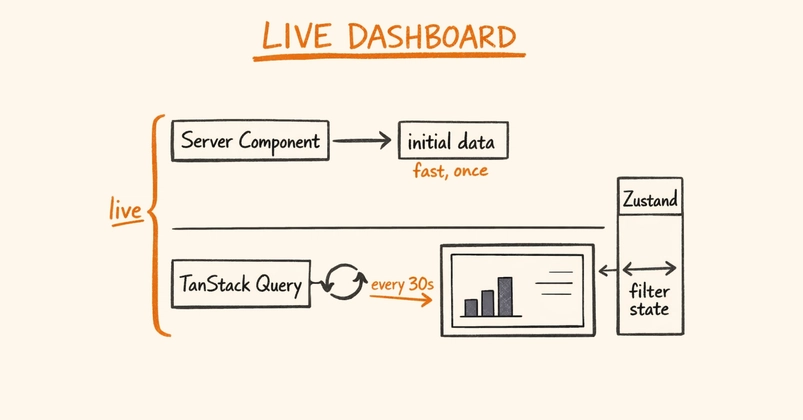
This article covers the client-side architecture: TanStack Query for data fetching and polling, Zustand for dashboard filter state, and Sentry for error monitoring.
The Architecture Question: Server Components vs Client
Next.js App Router gives you a real choice here. React Server Components fetch data directly — no client-side JavaScript, no loading states, no stale data problem. I used this approach for the HTPBE? admin dashboard and it works very well for a static view of current state.