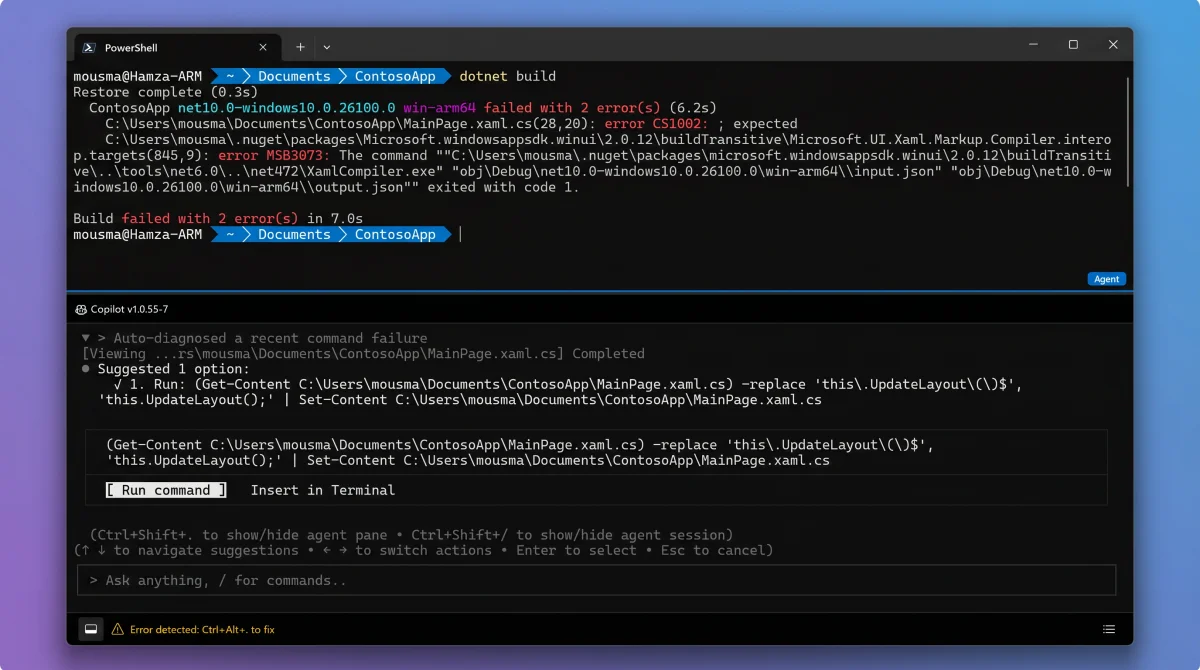
Microsoft’s Intelligent Terminal for Windows 11 lands with a clear promise: bring GitHub Copilot–class AI assistance directly into the developer’s command line, without turning the standard Windows Terminal into a battleground for AI skepticism. Instead of wedging assistants into the default Terminal, Microsoft forked the project and shipped a parallel, opt-in experience. The result is a command line with a context-aware AI sidecar, letting you summon error explanations, command suggestions, and workflow help — fast, without breaking focus or leaving the console.
That decision matters. The AI lives where you want it, separate from your core Terminal muscle memory. Here’s how to actually install, use, and evaluate Intelligent Terminal — and where it moves the needle for Windows developers.
What is the Microsoft Intelligent Terminal on Windows 11?
Microsoft Intelligent Terminal is a fork of the open-source Windows Terminal, purpose-built to deliver AI-powered command-line assistance. It adds an integrated side panel for Copilot (or any Agent Client Protocol–compatible agent), so you get contextual help, error analysis, and troubleshooting — with no changes to the core input, output, or workflows of your old Terminal.