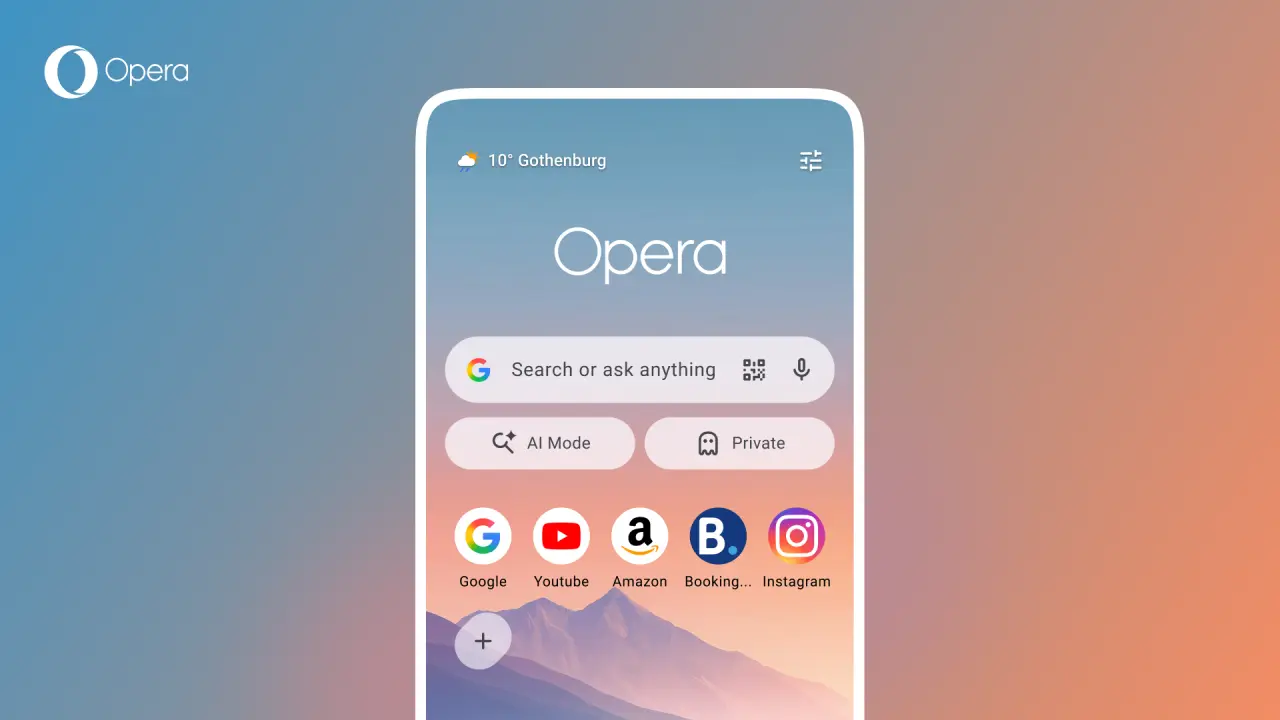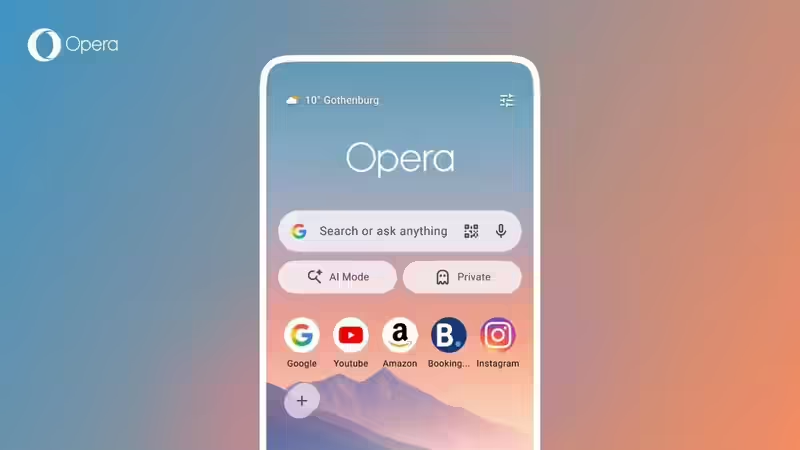
Photo credit: opera.comOpera has released a significant update for its Android browser, introducing a refreshed start page and a dedicated Football Hub designed to keep fans connected to live matches without leaving the browser. The update arrives as global interest in football intensifies and reflects Opera’s broader strategy of turning its browser into a content and information platform rather than merely a web navigation tool. Alongside visual improvements, the company has integrated real-time sports tracking, AI-powered news feeds, weather widgets and faster access to browsing features. The latest release demonstrates Opera’s efforts to differentiate itself in the highly competitive mobile browser market, where Google Chrome continues to dominate. By combining personalization, sports content and AI-driven features, Opera hopes to create a more engaging browsing experience for Android users worldwide.Key takeawaysOpera has rolled out a major update for its Android browser featuring a redesigned start page and a dedicated Football Hub.The new hub offers live scores, match statistics, team updates and real-time notifications.Users can now access weather information, AI Mode and private browsing directly from the home screen.Opera aims to reduce dependence on multiple sports and news apps by bringing football content into the browser.The update strengthens Opera’s challenge to Google Chrome by focusing on personalization and built-in content experiences.What’s new?The latest Opera for Android update introduces a combination of visual enhancements and sports-focused features aimed at improving user engagement. The company says the redesign reduces friction between opening the browser and accessing the content users care about most. The standout addition is the Football Hub, which provides live scores, match details and notifications. Meanwhile, the redesigned start page now includes new shortcuts and customization options. Users can also access AI-powered features directly from the home screen. The update is available for both Opera for Android and Opera Mini, ensuring a broader user base can benefit from the new tools. The enhancements highlight Opera’s growing focus on personalization and real-time information delivery within the browser itself.FeatureDescriptionFootball HubDedicated section for live scores, stats and football newsLive NotificationsAlerts for goals, kickoffs, red cards and final resultsRedesigned Start PageCleaner interface with easier navigationWeather WidgetReal-time weather updates on the home screenAI Mode ShortcutDirect access to Opera’s AI-powered toolsPrivate Browsing ShortcutOne-tap access to private sessionsCustom Speed Dial IconsRound, square or squircle icon optionsRedesigned home screen focuses on simplicity and faster accessA major part of the update is Opera’s redesigned start page, which serves as the browser’s primary landing screen. The company has streamlined the interface to make commonly used features easier to reach. A new weather widget displays real-time conditions at a glance, while dedicated shortcuts provide instant access to AI Mode and private browsing sessions. Opera has also expanded customization options, allowing users to choose between round, square and squircle Speed Dial icons. According to Opera, the redesign aims to create a more immersive and intuitive experience while preserving user choice.Existing customization features remain available for those who want to personalize their browsing environment. The refreshed interface reflects a broader trend among browser makers to turn home pages into personalized information dashboards rather than simple bookmark collections.Football hub becomes the centrepiece of the updateThe newly launched Football Hub is the headline feature of Opera’s latest Android update. Built specifically for football enthusiasts, the hub brings together live scores, statistics, match updates and AI-powered football news within a single interface. Opera says the feature is designed to eliminate the need for users to switch between multiple apps during major tournaments and league competitions. Fans can track ongoing matches through a live scores carousel and receive updates on their favourite teams.The hub also offers access to detailed match information, helping users stay informed even when they are unable to watch games live. With football remaining one of the most followed sports globally, Opera is leveraging fan interest to make its browser a destination for sports content and engagement.Core Features of the Football HubLive scores from ongoing matchesReal-time match statisticsTeam and player informationMatch event trackingFavorite team notificationsAI-powered football news feedHead-to-head team comparisonsLine-up and match detail accessHow the football hub delivers real-time match updatesOpera’s Football Hub is designed to function as a live sports companion inside the browser. Users can view ongoing match scores through a dedicated carousel that updates in real time. Selecting a specific match opens a detailed page featuring team line-ups, match events and statistical comparisons. Fans can also choose their favourite teams and receive instant notifications for important developments such as goals, red cards, kickoffs and final results.An AI-powered news feed further personalizes the experience by surfacing football stories based on user interests. The feature is particularly useful for fans who cannot watch every match live but still want immediate access to key developments. By integrating these tools into the browser, Opera aims to make football tracking faster and more convenient.Football Hub FunctionReal-Time BenefitLive Score CarouselInstant match score updatesMatch StatisticsDetailed performance insightsTeam NotificationsAlerts for important momentsMatch EventsGoals, cards and substitutionsTeam Line-upsPre-match squad informationHead-to-Head DataHistorical comparison between teamsAI News FeedPersonalized football coverageOpera’s strategy to challenge google chromeOpera’s latest Android update also highlights its ongoing effort to compete with Google Chrome, the dominant browser on Android devices. Rather than competing solely on speed or web standards, Opera is focusing on built-in experiences that encourage users to spend more time within the browser. Features such as the Football Hub, AI Mode integration, personalized news feeds and weather widgets provide services that often require separate apps on competing browsers.Chrome benefits from deep integration with Google services, but Opera is attempting to differentiate itself through customization and content-driven experiences. The company’s strategy suggests that future browser competition may increasingly revolve around integrated services and user engagement rather than traditional browsing performance alone.Can the new features help opera win more users?The success of Opera’s latest update will likely depend on how strongly users value integrated content experiences. Football remains one of the most widely followed sports globally, making the Football Hub a potentially powerful user acquisition tool. The addition of AI-powered features and a cleaner interface may also appeal to younger Android users looking for alternatives to Chrome. However, Opera faces the challenge of convincing users to switch from pre-installed browsers that already dominate the market.While the new update may not immediately disrupt Chrome’s leadership, it strengthens Opera’s position among users who prefer customization, sports content and built-in productivity tools. If the Football Hub gains traction during major tournaments, Opera could see increased downloads and engagement in key markets.Why the update matters for indian android usersIndia is one of the world’s largest Android smartphone markets and a major growth region for mobile browsers. The latest Opera update could resonate strongly with Indian users, many of whom follow football alongside cricket and rely heavily on smartphones for internet access. The Football Hub offers a convenient way to track international tournaments without installing additional sports applications. Meanwhile, the weather widget, AI Mode and customizable interface provide practical benefits for everyday browsing. Opera Mini’s inclusion of football features is also significant because it remains popular among users seeking data-efficient browsing experiences.As mobile internet consumption continues to grow across India, Opera’s focus on localized engagement and integrated services may help the company strengthen its presence in an increasingly competitive market.FAQs1. What is the biggest feature in Opera’s latest Android update?The dedicated Football Hub, which offers live scores, match statistics, notifications and AI-powered football news.2. Does the Football Hub provide live match notifications?Yes. Users can receive alerts for goals, kickoffs, red cards and final results.3. What changes have been made to the Opera home page?The start page now includes a weather widget, AI Mode shortcut, private browsing shortcut and new customization options.4. Is the Football Hub available in Opera Mini?Yes. Opera has extended football-related features to Opera Mini as well.5. How is Opera competing with Google Chrome?Opera is focusing on integrated experiences such as sports tracking, AI tools, personalized content and customization features to differentiate itself from Chrome.end of article
Opera refreshes android browser with new football hub and redesigned start page ahead of major football season
Find latest technology news, gadgets reviews & ratings. Popular & latest gadgets specifications, features, prices, photos & videos. Trending mobile phone comparisons, slideshows, how tos and videos for latest mobile phones, tablets, technology news updates.
1,314 words~6 min read