In any well-architected cloud setup, managing traffic efficiently and scaling resources on demand are key to keeping your applications fast, reliable, and cost-efficient.
AWS makes this easy with two core services: the Elastic Load Balancer (ELB) for routing traffic, and Auto Scaling Groups (ASG) for automatically adjusting compute capacity as traffic changes.
The AWS Elastic Load Balancer automatically distributes incoming requests across multiple targets, such as, EC2 instances, containers, or IPs, across different Availability Zones (AZs). AWS offers several types of load balancers, including Application, Network, and Gateway Load Balancers, each suited for different scenarios.
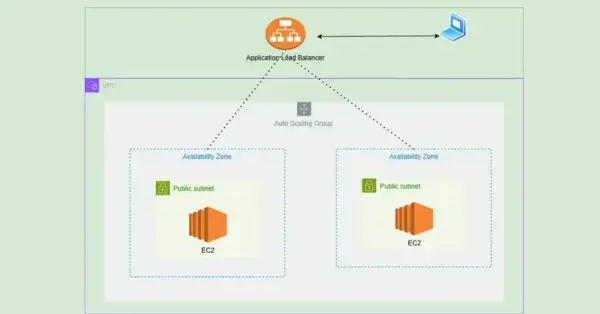
In this guide, we’ll set up an Application Load Balancer (ALB) connected to an Auto Scaling Group (ASG) using the AWS CLI.
Our setup will dynamically launch and manage EC2 instances, organized into a Target Group, ensuring smooth load distribution and high availability.





 aws.amazon.com