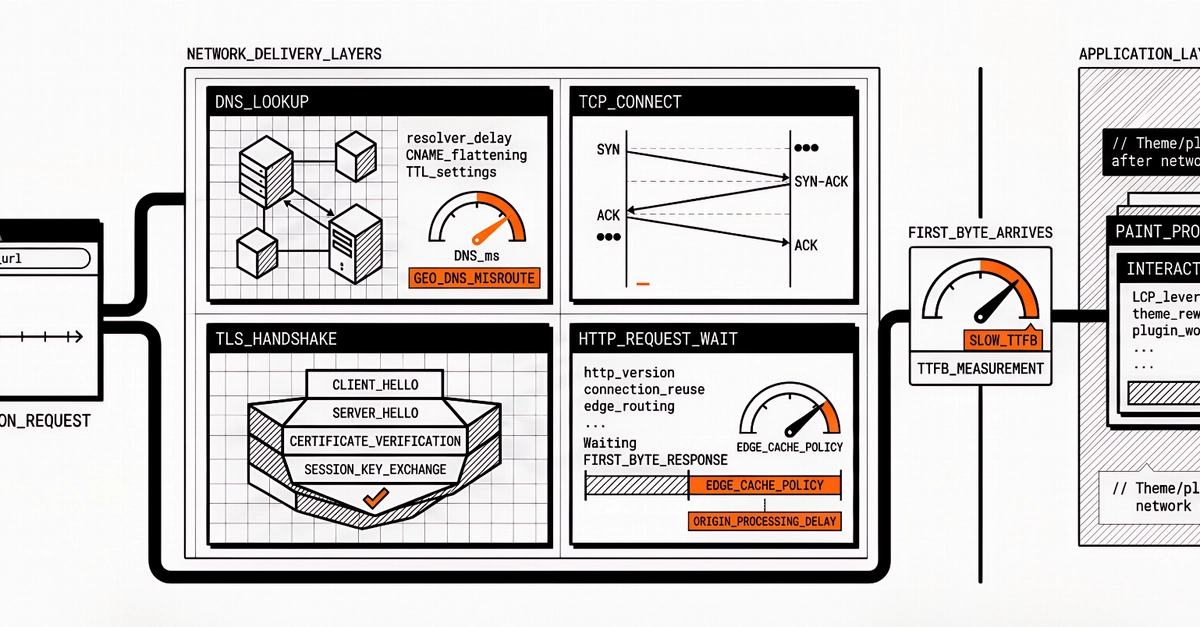
If your pages feel sluggish, Time to First Byte (TTFB) is often where to look first. TTFB measures how long the browser waits before the server sends anything back. That wait sits at the front of the loading chain: before rendering, before subresource discovery, before Largest Contentful Paint (LCP) can even begin. LCP tracks when the largest visible element on a page finishes rendering, and it can't start until that first byte arrives. A slow TTFB delays every metric that follows. This guide covers what TTFB measures, how to test it, what causes it to spike, and which fixes move the needle.What TTFB actually measuresTTFB is the elapsed time from the moment a browser initiates a navigation to the moment the server sends its first byte back. That single number is actually several phases stacked in sequence:Redirect time: Any HTTP redirects before the final request add a full round trip each.Service worker startup: If a service worker intercepts the request, its startup time adds to the wait.Domain Name System (DNS) lookup: The browser resolves the domain name to an IP address before it can open a connection.Connection and Transport Layer Security (TLS) negotiation: The Transmission Control Protocol (TCP) handshake and TLS handshake for HTTPS happen before a single byte of content is exchanged.Server processing: The time your server spends generating a response before it can start sending anything back.Which phase is slow determines which fix applies, so measuring before optimizing matters.Google's TTFB thresholdsGoogle evaluates TTFB at the 75th percentile per origin in Chrome User Experience Report (CrUX) data, using these thresholds:Good: 800ms or lessNeeds improvement: 800ms–1,800msPoor: over 1,800msIf you're in the "needs improvement" or "poor" range, users are waiting for your server before the page has done any work at all.Why TTFB matters for later metricsTTFB isn't a Core Web Vital, but it sets the clock for the ones that are. Google measures page experience through three Core Web Vitals: Largest Contentful Paint (LCP), which tracks how long it takes for the main content to appear on screen; Interaction to Next Paint (INP), which measures how quickly the page responds when a user clicks or taps; and Cumulative Layout Shift (CLS), which captures how much the page jumps around while it's still loading.None of those things can happen until the browser receives that first byte from the server. If the server takes 2 seconds to respond, the browser spends 2 seconds doing nothing, and every other metric starts its clock 2 seconds late.The field data shows the gap clearly: sites with poor LCP have a 75th-percentile TTFB of 2,270ms, while sites with good LCP have a median TTFB around 600ms. Faster server response doesn't guarantee good scores across the board, but a slow one makes them nearly impossible.Get started with Redis for faster appsReduce latency and handle data in real time.
Time to First Byte Test: Tools, Causes & Fixes
Learn how to test TTFB with Chrome DevTools, curl, and PageSpeed Insights. Find what's slowing server response times and fix it with caching and CDNs.
1,418 words~6 min read