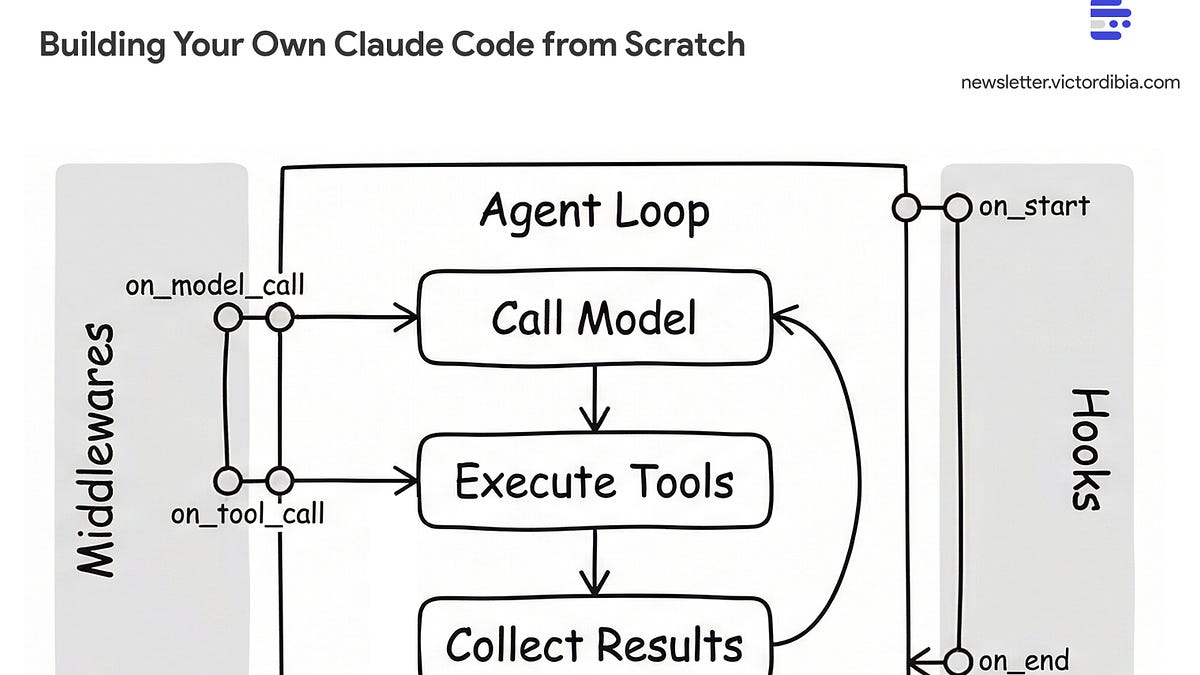
In a previous post, I walked through the basic agent execution loop - the while loop that calls a model, executes tools, and iterates. That loop is the foundation. But there’s a gap between a basic loop and agents like Claude Code, GitHub Copilot CLI, or Gemini CLI that handle complex, multi-step tasks over extended runs.Consider what happens when you ask Claude Code to “refactor this authentication system to use JWT tokens.” It needs to find all relevant files across the codebase, read and understand the current implementation, plan the changes, edit multiple files, run tests to verify nothing broke, and iterate if tests fail. That’s 20-40 iterations. Or more. Each iteration adds tool calls and results to the context. A basic loop can’t handle this - context explodes, the agent quits early, and you have no visibility into what’s happening.What bridges the gap? Three extensions:Tools - Not just any tools, but the specific set that enables code exploration and modification at scaleMiddlewares and hooks - Per-call interception for observability and safety, plus loop-level control for persistenceContext management - Strategies to handle the inevitable context explosionThis post walks through building an updated agent (beyond the for loop) using PicoAgents - the companion multi-agent framework built from scratch as part of the Designing Multi-Agent Systems book project.All code below comes from PicoAgents - a working framework you can install and run, not pseudocode. Snippets are simplified; comments note which source file each comes from.The first piece of the puzzle is assembling the right set of tools. Reviewing what Claude Code ships with is instructive - the tools cluster into four groups:Exploration - finding and reading codeRead - file contents with line numbers (supports images, PDFs, notebooks)Glob - fast file pattern matching (**/*.py, src/**/*.ts)Grep - content search using ripgrep with regex supportLS - list directoriesModification - changing code and running commandsWrite - create or overwrite filesEdit / MultiEdit - exact string replacement (requires unique match)Bash - execute shell commands with timeout and background supportNotebookEdit - edit Jupyter notebook cellsCoordination - managing complex tasksTask - launch sub-agents for complex tasks (Explore, general-purpose)TodoWrite - manage structured task lists with status trackingExitPlanMode - exit planning mode after creating implementation planInteraction - communicating with user and webAskUserQuestion - ask structured multiple-choice questionsWebFetch / WebSearch - fetch and search web contentSkill - execute user-defined skillsMCP tools - dynamic tools from MCP serversPicoAgents implements nearly all of these. The tool names differ (ReadFileTool, EditFileTool, BashTool, etc.) but the coverage maps one-to-one. PicoAgents also adds a ThinkTool for explicit reasoning and a SkillsTool for on-demand context loading via SKILL.md files.I covered how to implement tools (the @tool decorator, JSON Schema generation, and the tool execution pattern) in my agent execution loop post, and the broader arc of how tool calling has evolved in the arc of tool calling. PicoAgents’ tool implementations are in picoagents/tools/.What’s worth highlighting here are the design patterns specific to coding agent tools:Output truncation matters more than you’d think. A naive bash("ls -la") on a large directory dumps thousands of lines into context. Every token of that output gets carried forward to every subsequent LLM call. PicoAgents’ BashTool caps output and includes exit codes; ReadFileTool takes offset and limit parameters so the agent can read files in chunks.Structured errors over stack traces. Error: File not found: config.py is actionable. A Python traceback wastes tokens and confuses the model. Every tool should return a clear, concise error message that tells the model what to do differently.Edit uniqueness prevents wrong-location edits. The EditFileTool requires the target string to be unique in the file. If the string appears multiple times, the tool returns an error asking for more context. This is the same pattern Claude Code uses - it prevents the common failure of editing the wrong occurrence of a repeated string.The security model is local trust. These tools are powerful - bash can execute arbitrary commands, write_file can overwrite anything. This is intentional. Meta’s Rule of Two framework captures why this works: agents should satisfy no more than two of (A) process untrusted inputs, (B) access sensitive systems, (C) change state. A local coding agent satisfies B and C, but not A - the input is from you, the trusted user.Tools are only half the equation. The other half is how you instruct the model to use them. Claude Code’s system prompt has been published and reveals patterns worth adopting:Token minimization - “Responses under 4 lines unless detail requested” - saves contextBatch tool calls - “Call multiple tools in a single response” - fewer iterationsRead before edit - “NEVER edit a file you haven’t read” - prevents blind editsFollow patterns - “Examine neighboring files before writing” - consistencyVerify deps - “Never assume libraries exist” - prevents import errorsNo proactive docs - “NEVER create documentation unless requested” - stays focusedPicoAgents’ _instructions.py incorporates a good number of these patterns.As agents run longer, you need two kinds of control: visibility into individual operations (what tool just ran? how many tokens did that call use?) and control over the loop itself (is the task actually done? should the agent keep going?).PicoAgents separates these into two distinct mechanisms, following the pattern I described in my middleware post:Middlewares intercept individual tool/model calls. They fire around each operation and can log, block, or modify calls.Hooks intercept the agent loop itself. They fire before the first LLM call or when the agent tries to stop, and can inject instructions or check completion.Middlewares wrap individual tool and model calls. PicoAgents uses a BaseMiddleware class with two override points: on_model_call (fires around each LLM request) and on_tool_call (fires around each tool execution). Override either to log, modify, or block the operation:from picoagents._middleware import BaseMiddleware
Building Your Own Claude Code from Scratch
Issue #61 |Three Extensions That Turn your For Loop into an Agent like Claude Code
2,883 words~13 min read