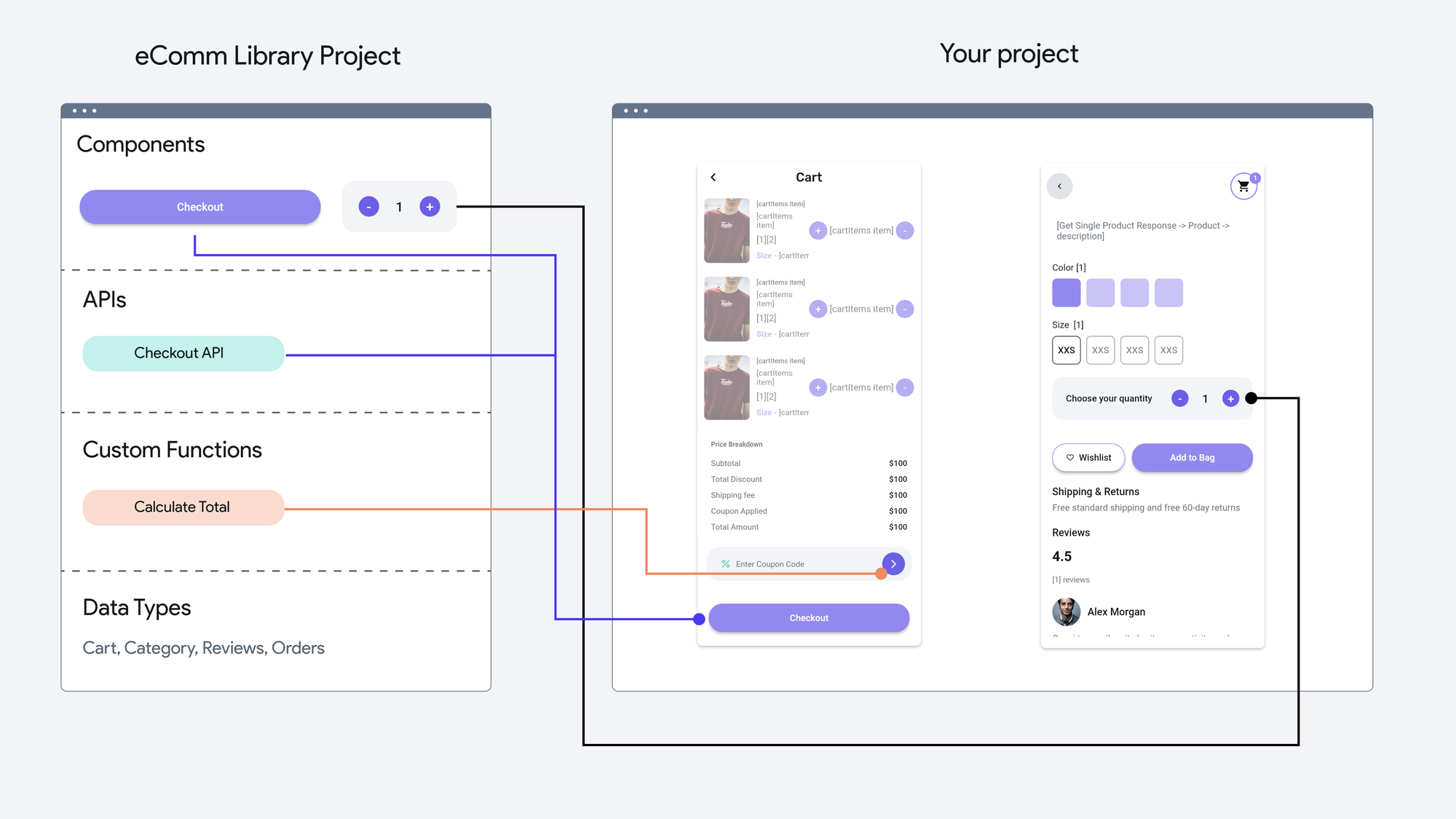
When FlutterFlow introduced Libraries, we at Appwrite saw an exciting opportunity to create a powerful integration that would make secure authentication accessible to FlutterFlow users. This article takes you behind the scenes of how we built the Appwrite Authentication Library and the technical decisions that shaped its development.📙Check out the library in the FlutterFlow Marketplace.Why We Built the Appwrite FlutterFlow LibraryAppwrite is a secure, open-source backend server that provides developers with a comprehensive set of APIs for building web, mobile, and Flutter applications. Our goal was to make Appwrite's robust authentication system easily accessible to FlutterFlow users, allowing them to implement secure user authentication without writing complex code.The Libraries feature provided the perfect platform for this integration. It allowed us to create a centralized source of reusable resources that could be shared across multiple FlutterFlow projects, making authentication implementation as simple as drag-and-drop.Appwrite Authentication KitThe Technical Implementation1. Core ArchitectureThe library's architecture is built around several key components, combining FlutterFlow's capabilities with custom logic written by Appwrite:Custom Actions: Built by Appwrite to wrap around Appwrite’s Flutter SDK for core auth flows.App States: FlutterFlow’s built-in state management system, used to store and persist user session data.Custom Data Types: Implemented by Appwrite for type safety and structure (e.g., AppwriteUser).Error Handling System: Custom logic by Appwrite to show user-friendly error messages and logs.class AppwriteAuthLibrary { final AppwriteConfig config; // Appwrite final AppwriteUserState userState; // FlutterFlow App State final Map<String, AuthActionHandler> actions; // Appwrite final AppwriteErrorHandler errorHandler; // Appwrite}Core Library Structure2. SDK IntegrationThe first technical challenge was integrating our existing Flutter SDK with FlutterFlow's visual builder:A. Dependency Management (by Appwrite)Added appwrite as a project dependency.Version constraints and compatibility checks.Semantic versioning strategy for predictable updates.B. Configuration ManagementFlutterFlow provides secure storage as part of its generated architecture. Appwrite added logic to securely store and validate config data (like endpoint, project ID, and API key) using this storage.class AppwriteConfig { final String apiEndpoint; final String projectId; final String apiKey; // Secure storage implementation Future<void> saveConfig() async { await SecureStorage.write('appwrite_config', { 'apiEndpoint': apiEndpoint, 'projectId': projectId, 'apiKey': apiKey, }); }}Configuration Management Example3. Data Type SystemOne of the most interesting technical challenges was creating a type-safe system that works seamlessly with FlutterFlow:A. Custom Data TypesImplemented by Appwrite:Created AppwriteUser and AppwriteUserResponse types.Added conversion logic between Appwrite SDK response and FlutterFlow-compatible structures.Ensured validation and runtime type safety.class AppwriteUser { final String id; final String email; final String name; final bool emailVerified; final String status; // Type conversion methods Map<String, dynamic> toJson() { return { 'id': id, 'email': email, 'name': name, 'emailVerified': emailVerified, 'status': status, }; } // Validation methods bool isValid() { return id.isNotEmpty && email.isNotEmpty; }}Custom Data Type ExampleB. State Management One of the most important aspects was handling user sessions and state. FlutterFlow provides a built-in App State system, which we used to persist data across app restarts.What we implemented:Leveraged FlutterFlow’s App State system for reactive updates.Added custom logic to update, clear, and sync session state.Implemented error handling and fallback strategies when state becomes invalid.class AppwriteUserState { AppwriteUser? currentUser; void update(AppwriteUser user) { currentUser = user; } void clear() { currentUser = null; }}So in conclusion:We implemented a reactive state system which leverages FlutterFlow's App State with custom hooks added by Appwrite.Built error state handling and recovery mechanisms which was implemented by Appwrite via custom code & Action Flow.Added state synchronization across app restarts powered by FlutterFlow’s persistent App State.4. Action ImplementationThe heart of the library lies in its custom actions:A. Authentication Actions initialize: Sets up the SDK and validates configuration signUpWithEmailAndPassword: Handles user registration signInWithEmail: Manages user login signOut: Handles session termination getCurrentUser: Provides session state managementclass SignInAction extends AuthAction { @override Future<AppwriteUserResponse> execute(Map<String, dynamic> params) async { try { final email = params['email'] as String; final password = params['password'] as String; // Validate input if (!isValidEmail(email)) { return AppwriteUserResponse.error('Invalid email format'); } // Execute sign in final result = await appwrite.account.createSession( email: email, password: password, ); // Update state await userState.update(result); return AppwriteUserResponse.success(result); } catch (e) { return AppwriteUserResponse.error( errorHandler.formatError(e), ); } }}Action Implementation ExampleB. Error Handling Implemented a consistent error response format Created user-friendly error messages Built logging for debugging and monitoring Added error recovery mechanismsTesting the LibraryTo test the Appwrite FlutterFlow Library, we created a sample project that imports the Library as a dependency. During active development, we used the "current" version rather than a static version to ensure we were always testing the latest changes.This sample project served two important purposes:1. Testing the complete authentication flow from sign-up to session management2. Providing a public demo for the community to understand how to use the libraryThe testing process helped us identify and fix several important issues:Configuration validationError handling in different scenariosState management across app restartsPlatform-specific behaviorsCreating DocumentationOnce the Library was thoroughly tested, we created comprehensive documentation to guide users through the implementation process. The documentation covers:Step-by-step setup instructionsConfiguration requirementsCommon use cases and examplesTroubleshooting guidesPlatform-specific considerationsWhat's NextWith FlutterFlow's Marketplace support for Libraries, we're excited to make the Appwrite Library more accessible to FlutterFlow users. The Marketplace integration allows developers to:Easily discover the Appwrite LibraryAccess our documentationAdd the library to their projects with a single clickAs our SDK evolves, the library will be updated to incorporate new features and improvements. With robust version control in place, we can seamlessly upgrade the package dependency version in our Library project, test new capabilities, and publish updates for FlutterFlow users.ConclusionBuilding the Appwrite FlutterFlow Library was a challenging but rewarding experience. It allowed us to make our authentication system accessible to a broader audience while learning valuable lessons about creating developer tools. We're excited to see how developers use this library to build secure applications with FlutterFlow.If you're interested in building your own FlutterFlow library, we encourage you to start with a clear problem to solve and focus on making it as simple and flexible as possible. The FlutterFlow team has created an excellent platform for sharing and distributing libraries, and we're excited to see what the community builds next.More Resources- Appwrite Documentation- FlutterFlow Marketplace- Appwrite FlutterFlow Demo App
Building the Appwrite FlutterFlow Library
When FlutterFlow introduced Libraries, we at Appwrite saw an exciting opportunity to create a powerful integration that would make secure authentication accessible to FlutterFlow users. This article takes you behind the scenes of how we built the Appwrite Authentication Library and the technical decisions that shaped its development.📙Check out the library in the FlutterFlow Marketplace.Why We Built the Appwrite FlutterFlow LibraryAppwrite is a secure, open-source backend server that provides developers with a comprehensive set of APIs for building web, mobile, and Flutter applications. Our goal was to make Appwrite's robust authentication system easily accessible to FlutterFlow users, allowing them to implement secure user authentication without writing complex code.The Libraries feature provided the perfect platform for this integration. It allowed us to create a centralized source of reusable resources that could be shared across multiple FlutterFlow projects, making authentication implementation as simple as drag-and-drop.Appwrite Authentication KitThe Technical Implementation1. Core ArchitectureThe library's architecture is built around several key components, combining FlutterFlow's capabilities with custom logic written by Appwrite:Custom Actions: Built by Appwrite to wrap around Appwrite’s Flutter SDK for core auth flows.App States: FlutterFlow’s built-in state management system, used to store and persist user session data.Custom Data Types: Implemented by Appwrite for type safety and structure (e.g., AppwriteUser).Error Handling System: Custom logic by Appwrite to show user-friendly error messages and logs.class AppwriteAuthLibrary { final AppwriteConfig config; // Appwrite final AppwriteUserState userState; // FlutterFlow App State final Map<String, AuthActionHandler> actions; // Appwrite final AppwriteErrorHandler errorHandler; // Appwrite}Core Library Structure2. SDK IntegrationThe first technical challenge was integrating our existing Flutter SDK with FlutterFlow's visual builder:A. Dependency Management (by Appwrite)Added appwrite as a project dependency.Version constraints and compatibility checks.Semantic versioning strategy for predictable updates.B. Configuration ManagementFlutterFlow provides secure storage as part of its generated architecture. Appwrite added logic to securely store and validate config data (like endpoint, project ID, and API key) using this storage.class AppwriteConfig { final String apiEndpoint; final String projectId; final String apiKey; // Secure storage implementation Future<void> saveConfig() async { await SecureStorage.write('appwrite_config', { 'apiEndpoint': apiEndpoint, 'projectId': projectId, 'apiKey': apiKey, }); }}Configuration Management Example3. Data Type SystemOne of the most interesting technical challenges was creating a type-safe system that works seamlessly with FlutterFlow:A. Custom Data TypesImplemented by Appwrite:Created AppwriteUser and AppwriteUserResponse types.Added conversion logic between Appwrite SDK response and FlutterFlow-compatible structures.Ensured validation and runtime type safety.class AppwriteUser { final String id; final String email; final String name; final bool emailVerified; final String status; // Type conversion methods Map<String, dynamic> toJson() { return { 'id': id, 'email': email, 'name': name, 'emailVerified': emailVerified, 'status': status, }; } // Validation methods bool isValid() { return id.isNotEmpty && email.isNotEmpty; }}Custom Data Type ExampleB. State Management One of the most important aspects was handling user sessions and state. FlutterFlow provides a built-in App State system, which we used to persist data across app restarts.What we implemented:Leveraged FlutterFlow’s App State system for reactive updates.Added custom logic to update, clear, and sync session state.Implemented error handling and fallback strategies when state becomes invalid.class AppwriteUserState { AppwriteUser? currentUser; void update(AppwriteUser user) { currentUser = user; } void clear() { currentUser = null; }}So in conclusion:We implemented a reactive state system which leverages FlutterFlow's App State with custom hooks added by Appwrite.Built error state handling and recovery mechanisms which was implemented by Appwrite via custom code & Action Flow.Added state synchronization across app restarts powered by FlutterFlow’s persistent App State.4. Action ImplementationThe heart of the library lies in its custom actions:A. Authentication Actions initialize: Sets up the SDK and validates configuration signUpWithEmailAndPassword: Handles user registration signInWithEmail: Manages user login signOut: Handles session termination getCurrentUser: Provides session state managementclass SignInAction extends AuthAction { @override Future<AppwriteUserResponse> execute(Map<String, dynamic> params) async { try { final email = params['email'] as String; final password = params['password'] as String; // Validate input if (!isValidEmail(email)) { return AppwriteUserResponse.error('Invalid email format'); } // Execute sign in final result = await appwrite.account.createSession( email: email, password: password, ); // Update state await userState.update(result); return AppwriteUserResponse.success(result); } catch (e) { return AppwriteUserResponse.error( errorHandler.formatError(e), ); } }}Action Implementation ExampleB. Error Handling Implemented a consistent error response format Created user-friendly error messages Built logging for debugging and monitoring Added error recovery mechanismsTesting the LibraryTo test the Appwrite FlutterFlow Library, we created a sample project that imports the Library as a dependency. During active development, we used the "current" version rather than a static version to ensure we were always testing the latest changes.This sample project served two important purposes:1. Testing the complete authentication flow from sign-up to session management2. Providing a public demo for the community to understand how to use the libraryThe testing process helped us identify and fix several important issues:Configuration validationError handling in different scenariosState management across app restartsPlatform-specific behaviorsCreating DocumentationOnce the Library was thoroughly tested, we created comprehensive documentation to guide users through the implementation process. The documentation covers:Step-by-step setup instructionsConfiguration requirementsCommon use cases and examplesTroubleshooting guidesPlatform-specific considerationsWhat's NextWith FlutterFlow's Marketplace support for Libraries, we're excited to make the Appwrite Library more accessible to FlutterFlow users. The Marketplace integration allows developers to:Easily discover the Appwrite LibraryAccess our documentationAdd the library to their projects with a single clickAs our SDK evolves, the library will be updated to incorporate new features and improvements. With robust version control in place, we can seamlessly upgrade the package dependency version in our Library project, test new capabilities, and publish updates for FlutterFlow users.ConclusionBuilding the Appwrite FlutterFlow Library was a challenging but rewarding experience. It allowed us to make our authentication system accessible to a broader audience while learning valuable lessons about creating developer tools. We're excited to see how developers use this library to build secure applications with FlutterFlow.If you're interested in building your own FlutterFlow library, we encourage you to start with a clear problem to solve and focus on making it as simple and flexible as possible. The FlutterFlow team has created an excellent platform for sharing and distributing libraries, and we're excited to see what the community builds next.More Resources- Appwrite Documentation- FlutterFlow Marketplace- Appwrite FlutterFlow Demo App