Skip to content
The combination of hardware required to make use of this project is specific enough that we imagine only a relatively limited number of readers will actually be able to try it out. But if you do happen to own a YubiKey and either a laser engraver capable of marking it or a fancy UV printer, [madeinoz67] has put together an awesome tool for adding some visual flair to your two-factor authentication device.
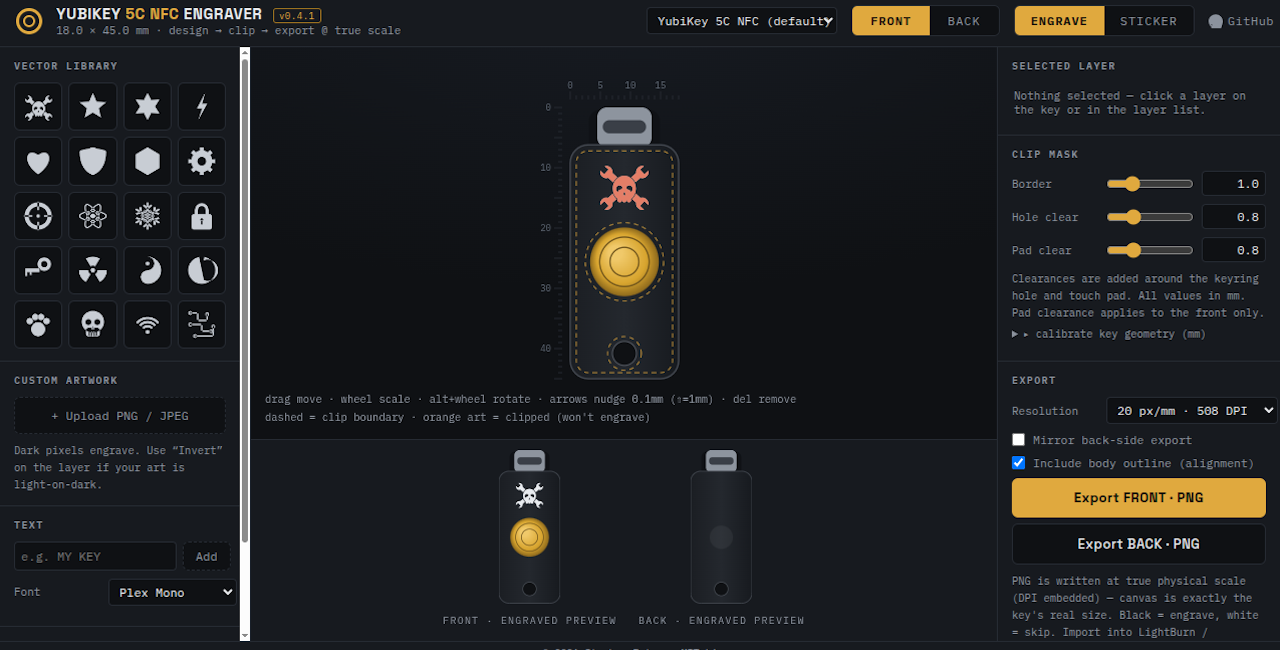
Running it is as simple as opening a web page, because that’s exactly how it’s implemented. You can either host it yourself or just launch it right from the GitHub repository. After opening the HTML file, you’re presented with a fairly intuitive user interface that lets you draw on top of a 2D outline of the YubiKey itself so you can get a better idea of what the final product will look like.
You can pick from an array of vector icons, upload your own images, and add custom text. There’s a pull-down at the top that lets you pick which specific YubiKey you want to work with, and there are different views depending on whether you plan on blasting your handiwork onto the device with a laser, doing a full-color UV print, or cutting it out of vinyl with something like a Cricut.