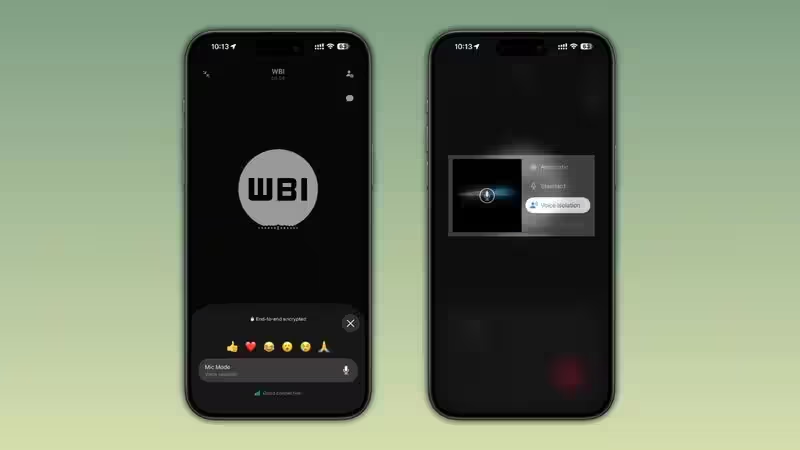
Users with iPhones will soon be able to access a new function that could potentially improve the audio quality of their voice and video calls in loud environments. The company has begun to add microphone mode toggle buttons right into its calling interface, allowing users to choose between different microphone modes offered by Apple right within the app.The update does not bring any new audio technologies from WhatsApp itself. The feature only brings the microphone modes, which have been available on iPhones ever since iOS 15, closer to the user through the addition of a shortcut button to the WhatsApp call interface. Previously, users had to find these options via the Control Center on their device.About The AuthorJournalist and a writer with a strong interest in news, culture, technology, and human-interest stories. Passionate about making complex topics accessible and engaging.The feature is slowly being rolled out as part of the most recent update to WhatsApp for iOS.Apple already had the feature - WhatsApp is making it easier to findWith the iOS 15 release, Apple launched microphone modes that would allow users to have greater control over the way their iPhone handles the audio of their call or recordings. This feature was then extended to include regular phone calls with the iOS 16.4 version, while the Automatic microphone mode came with iOS 18.Despite the availability of this feature for quite some time now, it has not been very popular, considering that the user would have to open it via the Control Center during an ongoing call.WhatsApp is making this process easier.The latest update of iOS (version 26.27.74) provides users with the ability to open microphone modes right from the call screen. When making a voice or video call, all you have to do is tap on the More tab and choose Mic Mode, which will open the system menu of Apple.Four microphone modes availableThe feature offers iPhone users to use the four microphone modes that exist in the latest versions of iPhones.More articles by AuthorTrending StoriesStandard mode is the default mode chosen by Apple in its audio processing, which is quite effective for normal conversations in quiet places.Voice Isolation mode helps reduce any background noise and ensures the clarity of the speaker's voice. It can be helpful when users take calls on the street, train stations, airports, cafes, and so on, where the surrounding noises prevent users from having a clear conversation.Wide Spectrum mode, on the contrary, is used to record all the sounds in the environment instead of removing them. This mode can be helpful when users need the other person to hear everything that is going on around them, at some concerts, sports games, family meetings, celebrations, etc.Automatic mode is selected automatically by iOS depending on the surrounding environment.Similar outcome, different technology than AndroidThe new feature definitely makes the phone calls more clear, but there is a difference between the technologies used by WhatsApp compared to the recent update of the company that appeared on Android devices.Some time ago, WhatsApp introduced its internal noise cancellation feature which uses WhatsApp's algorithm of processing audio signals to eliminate background noise. This feature is activated right inside the application.As far as iPhones are concerned, WhatsApp doesn't create an audio processing solution and uses Apple's microphone processing capabilities only. In other words, WhatsApp just offers an easier way to control these options.Therefore, in both cases the main purpose of these features is to improve voice clarity, but the technologies used in this process are different.Your preferred microphone setting stays activeOne thing about this feature that is very convenient is the fact that one does not have to pick his microphone mode every time he makes a phone call.Based on the implementation of the feature by Apple, once one picks his microphone mode, then iOS stores this setting for that particular application until the user changes the setting. For example, if a person is always making phone calls when in transit, he can set Voice Isolation once, and then all future WhatsApp calls will always be made in this setting automatically.Users that like Automatic or Wide Spectrum will not have to set the microphone mode again and again before each phone call.Which microphone mode should you choose?The optimal microphone mode will mostly depend on the location from where the user is placing the call.Voice isolation seems like an ideal microphone mode for most users, especially when placing calls from loud public places as it focuses more on voice, while eliminating background noises.Standard mode still remains the right microphone mode for noise-free indoor locations where extra processing of audio is not required.Wide spectrum mode is perfect when ambient sounds need to be heard. For instance, users listening to a live concert or a game can enable their friends to hear the ambiance.Automatic mode is for users who do not wish to change microphone modes manually, and hence the operating system determines the appropriate mode of the microphone.Rolling out gradually to iPhone usersHowever, the shortcut key for switching to microphone mode has been introduced by WhatsApp to people installing the latest version of WhatsApp on the App Store.There is no definite time frame mentioned by WhatsApp for the implementation of the feature, but we can expect it to reach more iPhones in the coming days. FAQsWhat is the WhatsApp microphone mode all about?It is a feature within the calling interface allowing iPhone users to access microphone processing modes available in iOS.Is WhatsApp now offering noise cancellation on iPhone?WhatsApp uses microphone processing available in iOS without implementing its own noise-cancellation feature.Which microphone mode should I use in noisy conditions?Voice isolation mode minimizes the noise in the background while the user speaks.Do I need to set up my microphone mode each time before making a call?There is no need as iOS remembers the microphone mode you choose until you change it.end of article
WhatsApp Rolls out Microphone Mode Controls for iPhone Calls: Here's what's Changing
iPhone users will soon access new microphone modes within WhatsApp calls. This feature brings Apple's existing audio controls directly into the app interface. Users can now choose between Standard, Voice Isolation, Wide Spectrum, and Automatic modes. Voice Isolation mode helps reduce background noise for clearer conversations. This update aims to improve call quality in noisy environments for iPhone users.
975 words~4 min read