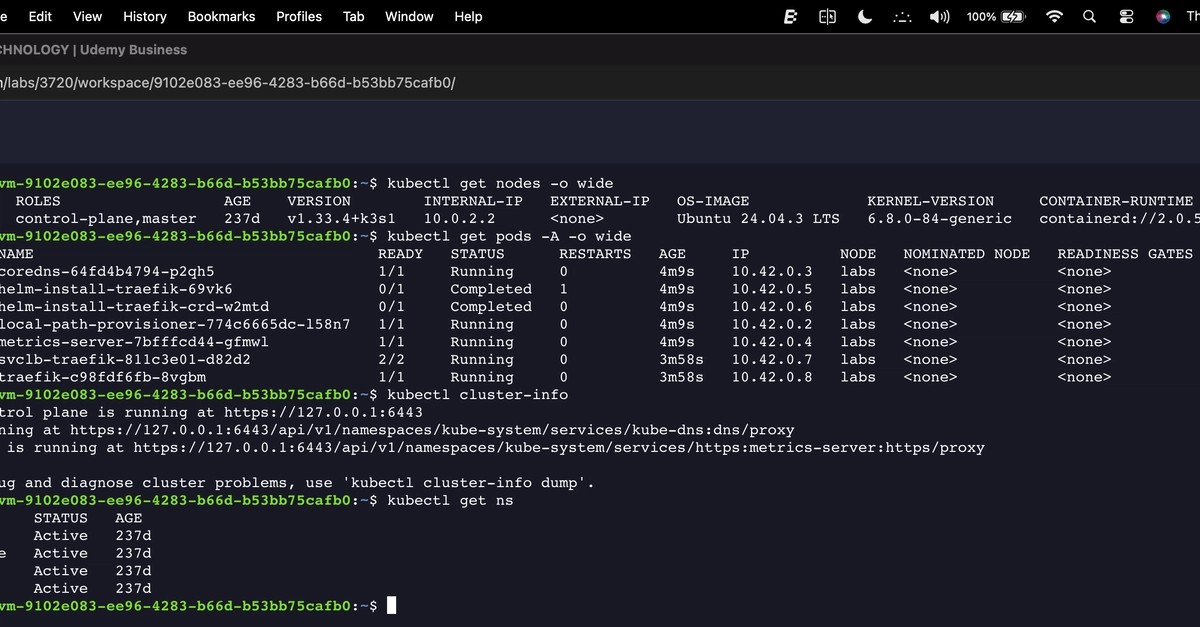
Before anything reaches production, you have to test it, validate it, and sometimes learn about it from scratch. All 3 of these steps are necessary to have a properly running environment but your window to complete them is almost always shorter than expected. Building an environment from scratch also eats up more time and resources than any test should.For most teams that run lab sessions regularly, setting up a lab environment manually takes roughly 40 minutes every time. The process always looks the same:Provision a virtual machineRegister the systemConfigure software repositoriesDownload and stage packagesTroubleshoot whatever breaks along the wayWith Red Hat interactive labs, you can skip all of that. Instead, you have immediate access to browser-based, preconfigured lab environments that give you a live Red Hat environment without any setup. Sign up with a Red Hat account, pick a lab, and a fully configured environment opens in your browser in minutes with no local installation or infrastructure to manage. The experience lives entirely in the browser, from the terminal session to the step-by-step instructions alongside it, as illustrated in Figure 1.
Figure 1. A live environment in the browser with no local setup and no subscription required The value of interactive labsThe value of interactive labs comes down to 2 things: They are available at no cost, and a live environment is ready in minutes. That combination turns work that used to require planning into something you can do today.CostFor organizations running lab sessions regularly, manual setup means recurring cloud infrastructure costs. Organizations pay for compute, storage, networking, and licensing every time a new environment spins up. Pricing varies widely depending on instance type and region. Interactive labs eliminate those costs entirely, as laid out in Table 1. They are available at no cost to anyone with a Red Hat account, there is no cloud instance to provision, and there are no fees accumulating in the background.Table 1. Lab environment setup: Cost comparisonManual lab setup costsInteractive labsCloud instance feesNo cloud instance neededStorage costsNo storage to provisionNetworking feesNo networking costsRed Hat Enterprise Linux licensingIncluded with your Red Hat accountYour cost: VariesYour cost: $0TimeWhen your environment is ready in a couple of minutes instead of 40, you can get straight to work. A faster environment matters most when time is tight, whether you are preparing for a change, validating something before a deadline, or getting up to speed on a technology before it matters in production.Consider a system administrator who needs to see how an operating system upgrade would behave before committing any production servers to it. They open a lab, select the right environment, and within minutes have a live system with the upgrade tooling already installed and ready to use. There’s no manual system registration, no package configuration, and no troubleshooting a broken setup. They run their validation and have a recommendation ready the same day.That kind of access changes what is practical. You can test before a migration, validate automation before running it against production, and explore a technology before committing to it. Each of these fits into a spare hour instead of requiring planning and infrastructure, as laid out in Table 2.Table 2. Interactive labs provision a live environment in around 5 minutes compared to roughly 40 minutes for a manual setupManual lab setupInteractive labsProvision virtual machineSign in with no-cost Red Hat accountRegister subscriptionSelect a labConfigure repositoriesEnvironment readyStage packagesPreconfiguredTroubleshoot issuesNot requiredTime spent: 40 minutesTime spent: Up to 5 minutesWhat is availableThe interactive labs catalog covers more than 70 different labs across a wide range of topics. Whether you are working with Red Hat Enterprise Linux (RHEL), exploring automation with Red Hat Ansible Automation Platform, or somewhere in between, you will find a lab that applies to what you are trying to accomplish. The catalog does not target one specific role or one specific use case. Anyone who needs a live Red Hat environment can find something relevant and get into it quickly.Red Hat Enterprise Linux labs span system administration, security, storage, image building, performance tuning, and more. You will find something applicable whether you are managing an existing environment or exploring what RHEL can do. For example, you can:Manage software from an application stream: Practice managing RHEL application modules in a live environment, without setting up a test system firstUpgrade to RHEL 9 in place with Leapp: Walk through an in-place upgrade in a prestaged environment before touching productionRed Hat Ansible Automation Platform labs cover everything from automation fundamentals to advanced topics, including event-driven automation and cloud operations. With these labs, you can:Get started with Event-Driven Ansible and Ansible Rulebooks: Explore event-driven automation with a live Ansible Automation Platform environment ready to goGet started with ansible-builder: Learn how to build automation execution environments without any local toolchain setup requiredEach lab pairs a live terminal session with step-by-step instructions in the same browser window. A single Red Hat account opens the entire catalog, with no separate access requests and no cost difference between labs.Wrapping upInteractive labs offer something straightforward: a live Red Hat environment, ready in minutes, at no cost. There’s no setup, no cloud account, and no infrastructure to manage. With more than 70 labs spanning RHEL and Ansible Automation Platform, you will find a starting point for whatever you are working on or wherever you are in your journey.To explore what is available, visit redhat.com/en/interactive-labs and sign in with a Red Hat account. The catalog is there, the environments are ready, and the setup is already done for you. Just sign in and start.