How to Build a Git Worktree Workflow for Faster Context Switching
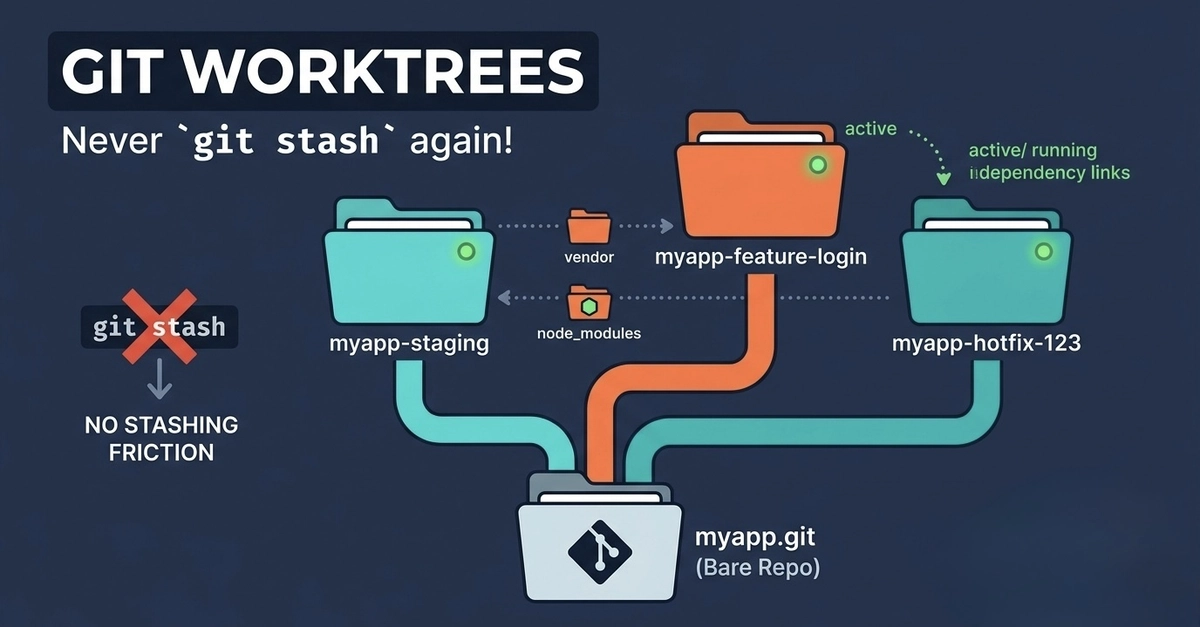
Git worktrees let you work on multiple branches from the same repository at once, which makes it much easier to juggle a feature, a bug fix, and a review without constantly stashing or re-cloning. The core commands are git worktree add, git worktree list, git worktree remove, git worktree move, and git worktree repair; they create linked working directories that share one repository’s data but keep separate working trees and indexes.
Why this workflow helps
A normal branch workflow forces you to stop, stash, switch, and restart every time you change tasks. With worktrees, each task gets its own directory, so your editor, terminal, and local server stay tied to one branch at a time. That reduces context-switching mistakes and makes parallel work feel much more like handling separate projects.
This is especially useful when you are reviewing a PR while still building another feature. Instead of losing your place, you can keep one worktree on the feature branch and another on the review branch, then compare behavior side by side.