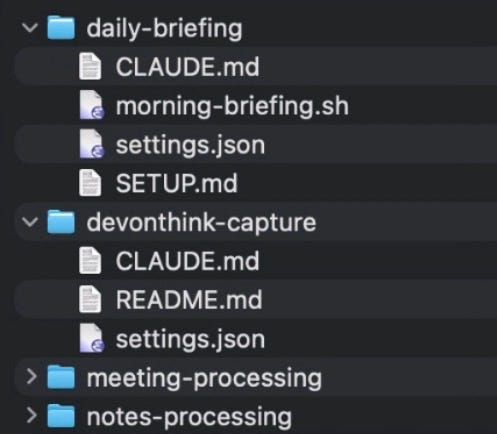
It takes time to create work that’s clear, independent, and genuinely useful. If you’ve found value in this newsletter, consider becoming a paid subscriber. It helps me dive deeper into research, reach more people, stay free from ads/hidden agendas, and supports my crippling chocolate milk addiction. We run on a “pay what you can” model—so if you believe in the mission, there’s likely a plan that fits (over here).Every subscription helps me stay independent, avoid clickbait, and focus on depth over noise, and I deeply appreciate everyone who chooses to support our cult.Help me buy chocolate milkPS – Supporting this work doesn’t have to come out of your pocket. If you read this as part of your professional development, you can use this email template to request reimbursement for your subscription.Every month, the Chocolate Milk Cult reaches over a million Builders, Investors, Policy Makers, Leaders, and more. If you’d like to meet other members of our community, please fill out this contact form here (I will never sell your data nor will I make intros w/o your explicit permission)- https://forms.gle/Pi1pGLuS1FmzXoLr6I’m really lucky to publish this guest post from James Wang . James has been a real friend of this community and a generous supporter of our work; his analysis helps me stay both grounded and find new framings for concepts that I had overlooked as trivial. He has a rare habit of looking at AI from multiple angles at once: what is technically real, how things worked historically, what is economically defensible, what is actually useful, and where the danger starts hiding. In the following guest post, James shares how he uses AI agents to get a lot of work done. He covers morning briefings, meeting pipelines, research capture, drafting workflows, permissions, context, iteration, and the security risks that show up the second these systems. If you’re looking for a practical guide on what you could do, this piece will help like a few others. As you read, here are a few things are worth thinking about:How much of the result comes from the model itself, and how much comes from the system James built around it? And where will this dynamic stretch in the future? What is the next evolution in context management, goiven that context does so much heavy lifting? How do you price the dynamic b/w convinience and security, and is that likely to change? What would change it? I have no doubt that you will enjoy this piece as much as I did. If you want to find James more regularly, would strongly recommend signing up to his newsletter below—and getting a copy of his excellent book: What You Need to Know About AI—what’s real, what’s hype, and where this technology is headed. It’s my go-to gift to anyone who wants to know about AI, and everyone whose read it has had rave reviews about it. On with the post—My day-to-day productivity stack now often feels more like managing a small team than it does running tools.I receive a morning briefing outlining emails I should respond to, tasks that are overdue, stakeholders I need to follow up with from my CRM (customer relationship management), and important news stories. After a meeting, I drop the recording and files (slide decks, etc.), and an agent picks it up, classifies it, and gives me a summary (or report, if it’s a prospective investment I’m evaluating). At the end of the day, I get a prompt to decompress, and an agent basically walks me through a 5-minute gratitude journal.Finally, I have a research assistant agent and a drafting agent that helps me write now—the last of which I’ll actually provide a full end-to-end of how this piece evolved from the agent.(See the GitHub repo here to see all the human/AI drafts!)This Substack isn’t meant to be a how-to or productivity blog. I’ve said that before, and I mean it.That being said, one of the reasons I ended up feeling like I needed to write this piece is no matter how much I explained the conceptual fundamentals, people didn’t really “get it.” I would tell people that they could easily use AI to substantially help speed them up in workflows that they were complaining about (ironic, I know, given my reputation as a “relative skeptic” in the world of Substack). Then, they would do something like “help me with X” in ChatGPT, find that it was minimally effective and clunky, and then give up.The second reason is because of OpenClaw (previously known as Moltbot and before that as Clawdbot). People would hear stories of it running their entire lives—along with running crypto schemes, trading markets, trolling people, or posting on Moltbook—and go, “Ah, that’s how I do what James asked me to do.” One of the last straws was someone mentioning that OpenClaw sounded a lot like something I would/did build.First off, I respect the hustle of the OpenClaw founder. Marketing and getting adoption for a product is often harder than building it. So, when I say that it’s both horribly flawed and not really that technically complex, I’m not trying to insult Peter Steinberger or say he doesn’t deserve whatever payday he got from OpenAI. He does.That being said, I would hesitate to recommend running it to those with a lot of expertise, and I would say, “hell no” to anyone who doesn’t understand it. Running OpenClaw without a good understanding is getting on the fast lane to having all your sensitive data (financial info, API keys, confidential data, etc.) stolen.In this piece, I want to prove (and then illustrate with my own examples) three things:Agents are extremely powerful... given the right context.Agents, without safeguards, are extraordinarily dangerous.Agents can already revolutionize your life and work—today.And I’d suggest everyone try to use them. Why? I always refer back to the poor NYU Stern professor who is now known as the subject of Bill Gurley’s “How to Miss by a Mile”—rebutting the professor’s piece in FiveThirtyEight on how “Uber Isn’t Worth $17 Billion.”Uber today is worth over $150B. More to the point, he admitted:“As I attempt to attach a value to Uber, I have to confess that I just downloaded the app and have not used it yet. I spend most of my of life either in the suburbs, where I can go for days without seeing a taxi, or in New York City, where I find that the subways are a vastly more time-efficient, cheaper and often safer mode of transportation than taxis.”Putting aside today’s insults of being an out-of-touch, elite NYC urbanite, it is truly difficult to understand a new technology without trying it. If you’re either worried or skeptical of AI agents... well, go find out for yourself.The definitive introductory textbook for AI, Artificial Intelligence: A Modern Approach—often simply referred to as “Russell-Norvig” after its authors—defines artificial intelligence research as “the study and design of rational agents.”I often push back against those who claim artificial general intelligence (AGI) is right around the corner. That being said, we unquestionably now have AI as defined by Russell-Norvig.While you could quibble and argue with how much “machine learning” or simply statistical methods fell into that category, one would be hard pressed to not call what we have with recent, modern models “rational agents.” Rational, after all, doesn’t mean perfect or infallible—which would disqualify even humans if we required that!The jump has been from models operating in a chat box—where they may be “rational,” but not agents—to operating in the real world. Or, at minimum, our working digital world, where our calendars, journals, memos, and everything else now exist. As I wrote in “The Boring Phase of AI,” this shift from chatting to doing is both less flashy and ultimately much more important.Ok, enough boring “blah, blah, blah, principles/safety/etc.” I suppose I now have to show examples of what I mean. Obviously, I do use Claude Code (and Codex) as coding agents. But I use them for far more as well.Let’s do this in a front-loaded fashion. The concepts in this one translate to most of the others.Every morning, I get a neat briefing. It basically looks like a personal assistant put it together. Let’s show rather than tell.Morning briefing on my iPad, piped to me in Day One, though it is also available in my DevonThink databases.It also flags for me what emails I should respond to and even points out things I should do (e.g., block out the morning for a long judging session).This is also in Day One, though I used the mobile view to show more of it. Yes, I know those are overdue tasks. Claude literally tells me every morning. I’ve been busy. Don’t judge me.How does it work? Well, every morning I launch a cron job*, which is basically a scheduled script. I use Claude Code in prompt mode, where I can pass it a prompt “non-interactively” (basically, I don’t need to chat with it). I give it dangerously-skip-permissions so it can run things./opt/homebrew/bin/claude -p “$MODE briefing for $DATE” --output-format text --dangerously-skip-permissions --max-turns 25 >> “$LOG_FILE” 2>&1For the non-technical, this looks like an arcane summoning to hell, but the key portions of it areclaude (command-line command for Claude Code—I just have the “full path” for it)-p (this is prompt-mode)--dangerously-skip-permissions (as suggested, this is dangerous but is required so it can run without me)As the name suggests, it’s dangerous (we’ll cover this later), but I restrict what it can do and access. I have my own MCPs (model context protocols) it can access, and most published MCPs (like Google’s for Gmail and Calendar) are cautious and have a level of protection.Think of them as tools that the model can call—with pre-specified functions and scope of what can be done with them.The reason, for example, why I need to push my briefings to Day One and DevonThink is Gmail will not allow a model using an MCP to actually send an email—the best it can do is a draft.But how does this headless, prompt-mode Claude Code know what to do?The two keys to all of this working are two files in the directory:CLAUDE.md: instructions to Claude Code that it will read to know what to dosettings.json: a configuration file for what MCPs Claude Code has access to (and what it is denied) EDIT: This should actually be under .claude/settings.json—I originally moved it so it’d be visible (dot files are hidden) and forgot to note this.Folder structure, which can already see has some of the other things in this screenshot. NOTE: see note above about where settings.json should actually live.CLAUDE.md, which is a standard instruction file for Claude Code for relevant context on a coding project... or a briefing.settings.json:{
How a leading Venture Capitalist uses AI Agents
A skeptic’s field guide to building personal agents that are powerful, practical, and safe
4,368 words~20 min read