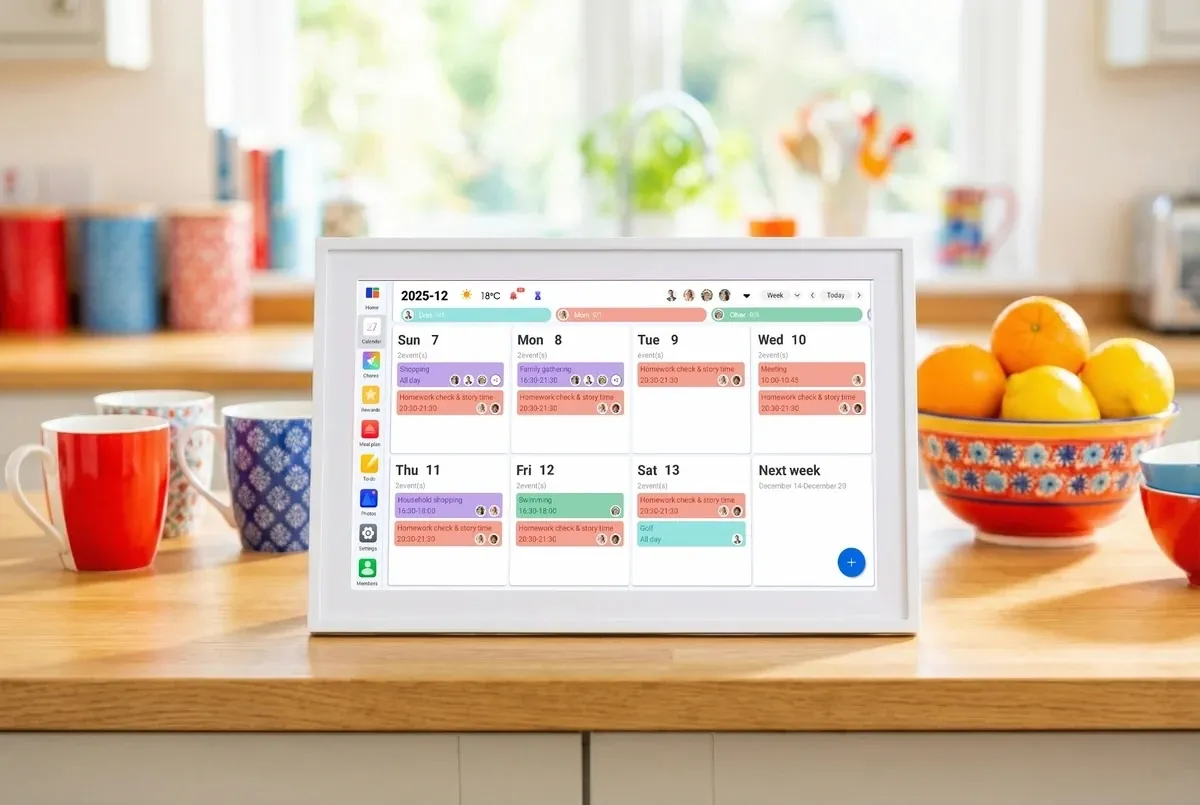
Digital calendars have become essential tools for managing schedules, coordinating teams, and organizing personal productivity. Businesses use them to track meetings and appointments, while individuals rely on them to plan daily tasks and events.Traditionally, building such applications required significant development resources, complex backend logic, and months of engineering work. Today, low-code development platforms make it possible to build a calendar app much faster by providing visual development tools, backend integrations, and pre-built components.Platforms like FlutterFlow allow developers and product teams to design user interfaces, manage data models, and deploy applications from a single environment. This approach significantly reduces development time while still enabling scalable and customizable applications.In this guide, we’ll explore the essential features of calendar apps, how low-code platforms work, and the step-by-step workflow required to build a calendar app using modern development tools. For additional tutorials and product insights, you can also explore the FlutterFlow Blog.Why Choose Low-Code for Calendar Apps?Low-code platforms simplify application development by providing visual tools that replace much of the manual coding required in traditional software development. Instead of writing large volumes of code, developers configure application logic through graphical interfaces, reusable components, and integrated backend services.This approach offers several advantages when learning how to build a calendar app:faster development cycleslower development costssimplified maintenanceeasier collaboration between designers and developersLow-code platforms also allow teams to launch a minimum viable product quickly and improve it through iterative updates. Key Features Every Calendar App NeedsWhen planning to build a calendar app, defining the right feature set is critical. Most successful calendar applications include several core capabilities that support scheduling and collaboration.Common features include:Event creation and editing – allowing users to add, update, or delete calendar eventsRecurring events – scheduling meetings that repeat on specific intervalsReminders and notifications – alerting users before events beginCalendar views – displaying schedules in daily, weekly, or monthly layoutsSharing and collaboration – enabling users to share events or calendars with othersChoosing the Right Low-Code PlatformSelecting the right development platform is a key decision when learning how to build a calendar app.A suitable low-code platform should provide:flexible UI design toolsbackend database integrationsAPI connectivitysecure authentication systemsscalable deployment optionsPlatforms like FlutterFlow combine these capabilities in one environment, enabling teams to build and deploy applications without managing separate infrastructure components. Additionally, the platform allows developers to extend application functionality through custom code actions, which provide flexibility for advanced features when necessary.Architecture & Tech Stack OverviewEven low-code applications rely on several technical layers working together. A typical calendar application architecture includes:Frontend interface – the visual layer where users interact with the calendarDatabase – storing events, users, and schedulesBackend services – managing authentication and data synchronizationAPIs and integrations – connecting with external services such as messaging or productivity toolsLow-code platforms simplify this architecture by integrating these components into a unified development environment. Modern development platforms allow teams to configure databases, workflows, and UI elements visually while maintaining scalability as user demand increases.Step-by-Step Development WorkflowDeveloping a calendar application using low-code tools typically follows a structured workflow.Plan & Design the UI/UXStart by designing the user interface and defining how users interact with the calendar. Common layouts include monthly views, agenda views, and event detail screens. FlutterFlow’s visual design environment allows teams to prototype interfaces quickly and refine layouts before launching.Set Up the Data ModelThe next step is creating a data structure for storing calendar events, users, reminders, and recurring schedules. Proper data modeling ensures the application can support features like event sharing and synchronization.Build Event CRUD FunctionsCalendar apps rely heavily on CRUD operations—create, read, update, and delete event records. Low-code platforms simplify these operations by providing built-in data management tools that connect UI elements to backend databases.Add Recurrence & RemindersRecurring events and notifications are essential calendar features. These functions typically rely on backend workflows that trigger reminders at specific times.Enable Sharing & SyncCollaboration features allow users to share events or entire calendars with teammates. Many apps also support synchronization with external calendar services.Test, Secure & OptimiseBefore launching the app, thorough testing ensures the platform handles edge cases such as conflicting events or incorrect time zones. Security measures should include authentication, encrypted data transmission, and access controls.Deploy to Stores & WebOnce testing is complete, the application can be deployed to web platforms or mobile app stores. FlutterFlow supports application deployment across multiple platforms, allowing developers to launch apps quickly.Cost, Time & Resource EstimatesThe cost to build a calendar app depends on feature complexity and development approach. Traditional development projects often require several months of engineering work. Low-code development significantly reduces this timeline by providing visual development tools and pre-built components.Typical costs include:platform subscriptionshosting infrastructuremaintenance and updatesthird-party service integrationsLow-code tools allow startups and businesses to build applications with smaller teams while maintaining scalability.Best Practices & Optimization TipsTo ensure long-term success when building a calendar application, consider the following best practices:design intuitive user interfacesoptimize performance for large event datasetsimplement robust reminder systemsensure secure authentication and data protectiondesign scalable backend infrastructurePlatforms that support modular development make it easier to expand features over time. FlutterFlow’s reusable libraries allow developers to scale applications efficiently while maintaining clean architecture.Conclusion & Next StepsLearning how to build a calendar app no longer requires large engineering teams or complex development infrastructure. Low-code platforms have transformed application development by making powerful tools accessible to startups, businesses, and individual developers.Platforms like FlutterFlow combine visual development tools, backend integrations, and scalable architecture in one environment, allowing teams to build and launch applications faster. If you're planning to create a scheduling platform or productivity tool, exploring FlutterFlow is a great starting point for building and deploying your calendar app efficiently.FAQCan I migrate a low-code calendar to custom code later?Many platforms support extensibility through custom integrations or code export, allowing developers to extend functionality as applications grow.How do low-code platforms handle time-zone conversions?Most platforms manage time-zone conversions automatically through backend services and standardized time formats.What integrations exist for Google and Outlook calendars?Calendar apps often connect to external productivity services through APIs, enabling event synchronization across platforms.Is offline functionality possible with low-code?Some low-code platforms support offline data storage and synchronization to ensure users can access schedules without an internet connection.How secure are low-code calendar apps?Security depends on proper authentication systems, encrypted data transmission, and secure backend services that protect user information.
How to Build a Calendar App Using a Low Code App Development Platform
Build a calendar app faster with low-code. Learn must-have features, pick the best platform, follow our detailed workflow, and launch today.
1,034 words~5 min read